Animated Bible stories used to take a studio and a budget. Now a Sunday school teacher, a youth pastor, or a faith channel can turn a passage into a narrated, animated story video in an afternoon with AI. The tools are easy. The part that deserves care is the content: staying faithful to the text, choosing a style that fits the audience, and treating the story with respect. This guide covers both, then the exact steps in ClipNova.
Want to start right away? The AI Bible Video Generator turns a passage into a narrated, animated story video in a gentle 3D, claymation, or cinematic look.
For a wider look at story tools, see the AI video generators for storytelling comparison.
Start with the passage, not the prompt
The most common mistake with AI Bible videos is letting the AI invent the story. It will happily add dialogue, characters, and events that are not in the text. Avoid that from the start:
- Pick one passage with a clear beginning, middle, and end. Genesis 6 to 9 for Noah, 1 Samuel 17 for David and Goliath, John 2:1-11 for the wedding at Cana.
- Write the script from the text. Retell it in simple language, in order, without adding scenes. If you let the AI draft it, check every line against your Bible.
- Quote one verse. A single key verse, read by the narrator and shown on screen with its reference, anchors the video in scripture.
- Have someone read it. A pastor, teacher, or parent checking the script before you generate catches more than any tool.
A 2 minute script is about 250 to 300 words. Six to eight scenes, one event each.
Choose a style for your audience
The style says who the video is for before a word is spoken.
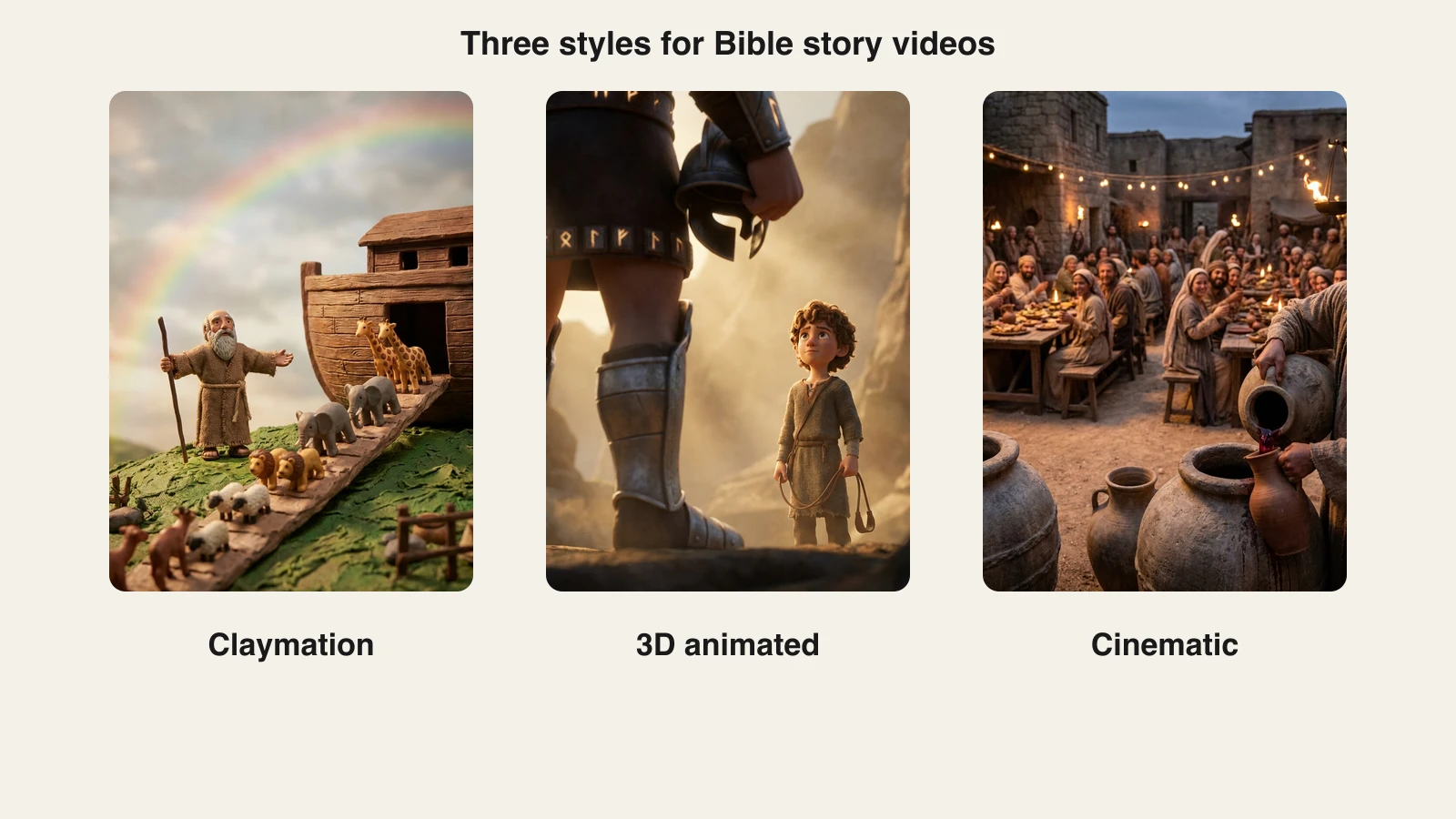
- Claymation. Warm, handmade, gentle. Excellent for young children and Sunday school, and it keeps sensitive moments (the flood, a battle) soft.
- 3D animated. The familiar family-film look. Expressive characters, bright light, easy for kids to follow.
- Cinematic. Photorealistic, period costumes, candlelight. Best for teens and adults, devotionals, and Easter or Christmas specials.
- Watercolor. Quiet and reflective. Suits psalms, parables, and prayer videos.
Whatever the style, keep violence implied rather than shown, and depict Jesus and the prophets with dignity: calm expressions, simple clothing, no exaggerated cartoon faces.
Make it with ClipNova
ClipNova turns the script into a finished Bible story video in one project: scenes in one consistent style, a warm narrator voice in your language, gentle music, and captions, exported for YouTube, Shorts, or a projector screen. The AI Bible Video Generator is built for exactly this, the AI story video generator covers narrated stories in general, and the AI animation generator covers claymation and 3D styles in depth.
- Sign in at app.clipnova.io.
- Open AI Video Studio, then Prompt to Video for a full narrated story, or AI Cartoon Video for a short, playful version for kids.
- Paste your script, or a prompt that names the passage and the key verse.
- Pick the style: Claymation, Disney / Pixar 3D, Cinematic, or Watercolor.
- Choose 16:9 for YouTube or a classroom screen, 9:16 for Shorts and Reels. Set the length (up to 5 minutes), a warm narrator voice in your language, and subtitles on.
- Generate and watch it through. Regenerate any scene that adds something the passage does not say, or that feels irreverent.
- Export in 1080p.
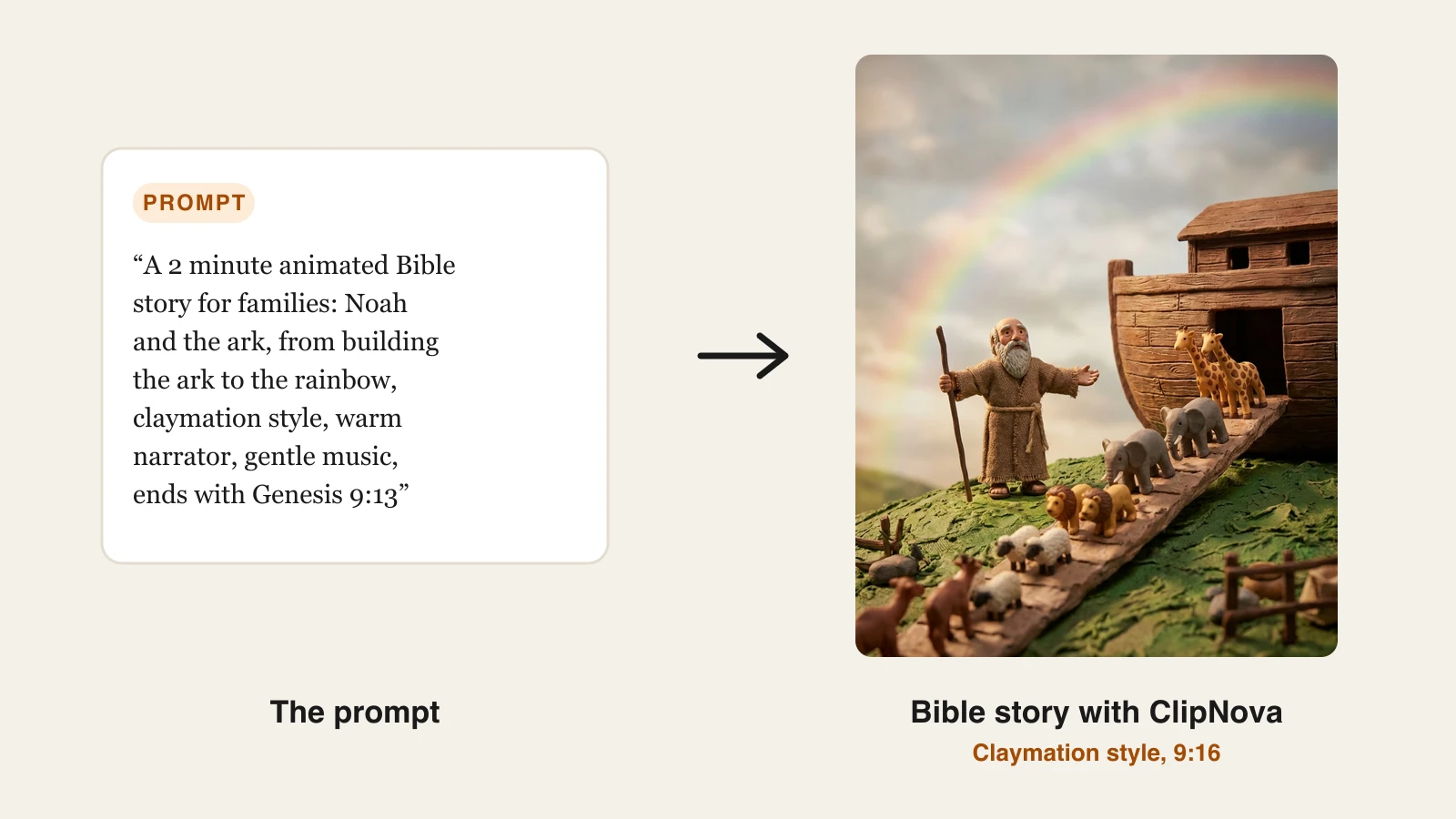
The cover prompt produced this claymation frame of Noah's ark. Here is how the same kind of story looks in the three most used styles:
Plans start at $19 a month with the full feature set and full commercial rights on every tier, so churches and ministries can use the videos freely; the pricing page has the credit breakdown.
One story, many languages
Bible stories travel. Once the scenes are made, the same video can carry a narrator in Spanish, Portuguese, French, Tagalog, Hindi, or any of the 30+ languages ClipNova supports. Two rules:
- Use a published translation of the passage in that language for the quoted verse, rather than a machine translation of the English.
- Ask a native speaker from your church or community to listen once before you share it.
Prompts you can copy
- Noah and the ark: "A 2 minute animated Bible story for families: Noah and the ark, from building the ark to the rainbow, claymation style, warm narrator, gentle music, ends with Genesis 9:13."
- David and Goliath: "A 90 second Bible story for kids from 1 Samuel 17: young David the shepherd faces Goliath with a sling and his trust in God. 3D animated style, the battle implied, not shown. Ends with 1 Samuel 17:47."
- Water into wine: "A 2 minute cinematic retelling of John 2:1-11, the wedding at Cana. Candlelit village feast, stone water jars, Mary speaking to the servants, reverent tone, calm narrator."
- Parable: "A 90 second watercolor video of the parable of the prodigal son from Luke 15:11-32, told simply, ending on the father running to meet his son."
What goes wrong, and the fix
- The AI added to the story. Rewrite the script from the passage and paste it in full rather than a one-line idea.
- Characters change between scenes. Describe each main figure the same way in every scene (age, robe color, beard), or use a reference image.
- Too dark or too violent for kids. Switch to claymation or 3D and ask for the moment to be implied.
- Cartoonish in the wrong places. Keep comic energy for side characters and animals; keep Jesus, the prophets, and prayer scenes calm.
- No reference. Always name the book and chapter. Viewers want to read it for themselves.
Start with one well-known story, show it to the people you made it for, and ask what they want next. A small series built on real requests, one story a week, becomes a library a church or a family returns to for years.
Frequently asked
How do I make an animated Bible story video with AI?
Choose one passage, write a short script that stays close to the text, pick a visual style (claymation or 3D for families, cinematic for adults), and generate it with a warm narrator voice, gentle music, and captions. In ClipNova that is AI Video Studio, then Prompt to Video or AI Cartoon Video with the Claymation, Disney / Pixar 3D, or Cinematic style.
Which Bible stories work best as short videos?
Stories with one clear arc and strong images: Noah and the ark, David and Goliath, Jonah and the whale, Daniel in the lions' den, the water turned into wine at Cana, the feeding of the five thousand, and the parables such as the prodigal son and the good Samaritan.
How do I keep AI Bible videos faithful to scripture?
Write the script yourself from the passage, or have the AI draft it and check every line against your Bible. Name the reference on screen or in the narration, keep invented dialogue to a minimum, and do not add events the text does not contain. A pastor or teacher reading the script before you generate is the simplest check.
Can I make Bible story videos in other languages?
Yes. ClipNova narrates in more than 30 languages, so the same scenes can carry a Spanish, Portuguese, French, or Tagalog voiceover. Use a published translation of the passage in that language for any quoted verse.
How long should an animated Bible story be?
60 to 90 seconds for Shorts and Reels, 2 to 5 minutes for a full story on YouTube or in a Sunday school lesson. ClipNova renders up to 5 minutes in one go.