AI video generator pricing in 2026 runs from $10 to about $29 per month for entry plans, but the headline number tells you almost nothing. The same $19 buys roughly 50 seconds of raw footage on one tool, 10 avatar minutes on another, and a full month of finished, captioned videos on a third. ClipNova is the strongest value in the category, from $19 per month with every feature on every plan, because its price covers the complete video, script, voiceover, captions, and music included, not just the footage.
This guide breaks down what seven major tools actually charge, how their credit systems work, and where the hidden limits sit. If you are only hunting for the lowest sticker price, our cheapest AI video generator roundup ranks tools by entry cost. This article answers the harder question: what does a finished AI video really cost you per month?
AI video generator pricing at a glance
- ClipNova: Best value per finished video. From $19/mo, every plan has the full feature set (voiceover, captions, 1080p export, commercial rights, hosted frontier models), and only monthly credits differ.
- Runway: Best flagship footage, priced per second. From $12/mo billed annually, but Gen-4.5 burns 12 credits a second, so iteration gets expensive fast.
- Kling AI: Lowest entry price for raw clips. $10/mo Standard with 660 credits, though costs vary sharply by model and mode.
- Synthesia: Clearest per-minute pricing for avatar videos. Starter is $18/mo billed annually for 10 avatar minutes a month, built for training content.
- HeyGen: Avatar marketing videos on a credit meter. Creator is $29/mo for 600 credits, but newer avatar models consume credits much faster than older ones.
- InVideo AI: Yearly-billed social video credits. Plus is billed at $200/year (about $17/mo) for 75 monthly credits.
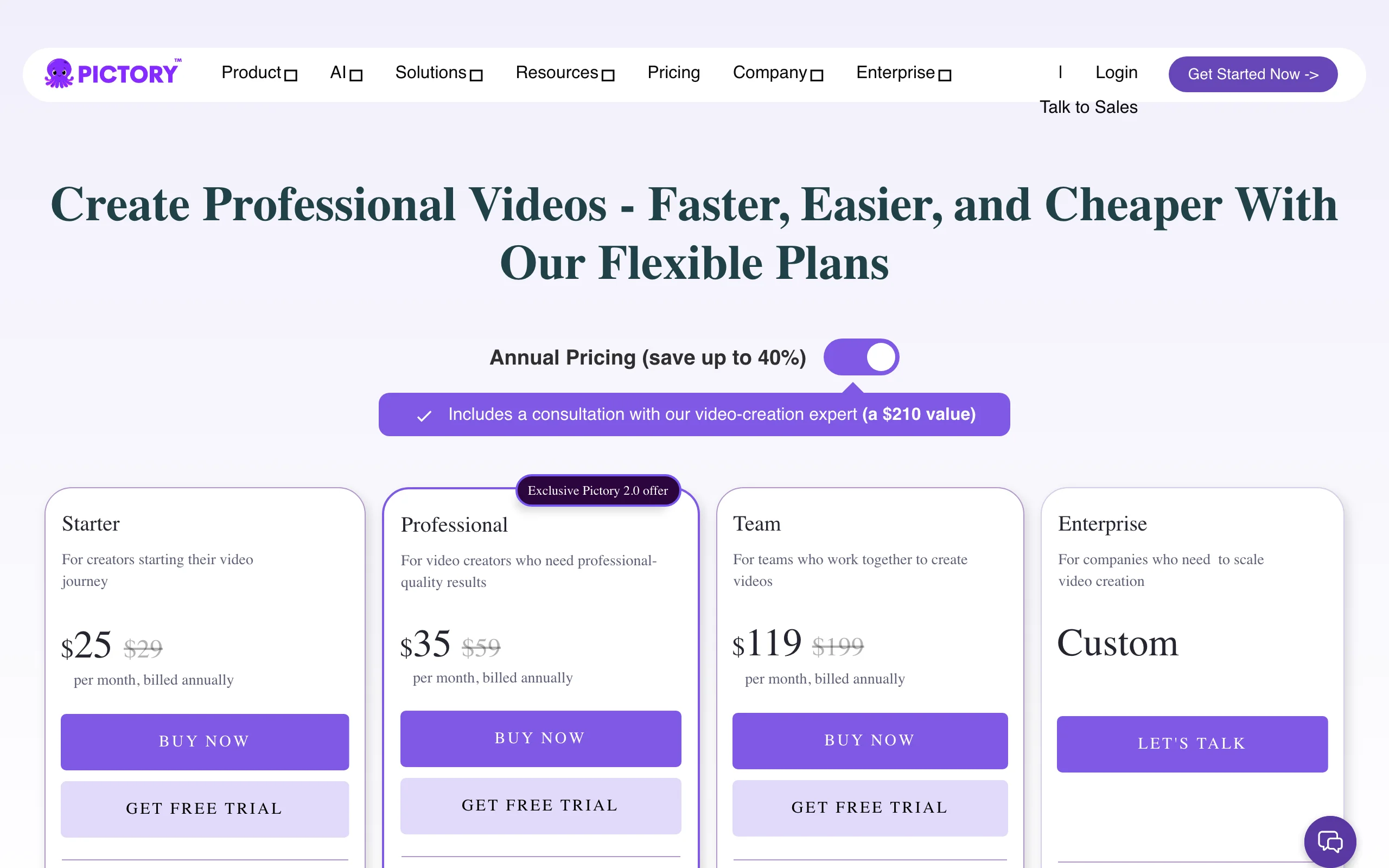
- Pictory: Dual-quota repurposing pricing. From $25/mo billed annually, metering video minutes and AI credits as two separate allowances.
| Tool | Entry paid price | What the entry plan buys | Pricing model |
|---|---|---|---|
| ClipNova | From $19/mo | 1,000 credits, full feature set, watermark-free 1080p | Flat tiers, only credits differ |
| Runway | From $12/mo (annual) | 625 credits, about 50 sec of Gen-4.5 footage | Per-second credit burn |
| Kling AI | From $10/mo | 660 credits for raw clips | Credits, cost varies by model |
| Synthesia | From $18/mo (annual) | 10 avatar minutes a month | Per-minute allowance |
| HeyGen | From $29/mo | 600 credits, watermark removed, 1080p | Credits mapped to avatar minutes |
| InVideo AI | $200/yr (about $17/mo) | 75 AI credits a month | Credits per generation |
| Pictory | From $25/mo (annual) | 200 video minutes plus 100 AI credits | Dual quota: minutes and credits |
Reading the table: entry prices are not comparable units. A Runway credit buys seconds of raw footage you still have to edit and voice. A ClipNova credit budget covers the finished video with script, narration, captions, and music already in it.
The three pricing models behind every AI video subscription
Every tool in this comparison uses one of three pricing structures. Knowing which one you are buying into matters more than the monthly price.
1) Per-second credit burn
Runway and Kling AI charge by generation length and model quality. Runway's flagship Gen-4.5 costs 60 credits per 5-second clip, or 12 credits a second. That sounds abstract until you do the math: a single 10-second take is 120 credits, and five takes of the same shot (normal when you are iterating on a prompt) is 600 credits, nearly the entire 625-credit monthly allowance of the Standard plan. Per-second pricing rewards people who know exactly what they want and punishes experimentation. If that math pushes you away, see the best Runway alternatives.
2) Per-minute allowances
Synthesia and Pictory meter finished output minutes. This is the most predictable model: Synthesia's Starter plan gives you 10 avatar minutes a month, so a minute of finished avatar video costs about $1.80 to $2.90 depending on billing. The catch is the ceiling. Ten minutes disappears quickly if you produce weekly content, and overage means upgrading the whole plan. Pictory complicates it further by running two meters at once, video minutes and AI credits, and you can exhaust either one first.
3) Flat tiers where only volume changes
ClipNova prices the third way: every plan, from the $19 Hobby tier to the $199 Ultra tier, includes the identical feature set, and the tiers differ only in monthly credits (1,000 to 12,000). Nothing is feature-gated, so you never upgrade to unlock captions, 1080p export, or commercial rights, only to get more volume. It is the easiest model to budget because the question is just how many videos you publish.
Two honest warnings that apply almost everywhere, including ClipNova: unused monthly credits expire at the end of the billing cycle, and premium models burn credits faster than standard ones. Always translate credits into finished videos for your workflow before you pay.
1. ClipNova pricing, best value per finished video
ClipNova turns a prompt into a complete, publish-ready vertical video: script written, voiceover recorded in any of 18 languages, visuals generated, captions burned in, music added, with any character you save keeping one look throughout. That scope is why its pricing wins on effective cost. Competing plans price the footage; ClipNova's price covers the whole deliverable, so there is no second subscription for voiceover, captioning, or editing hiding behind the sticker price. It also hosts frontier models (Sora 2, Veo 3, Kling, and more) inside one subscription, so you are not stacking three model subscriptions to compare outputs. If you are choosing between the two headline models, read Sora vs Veo first.
For your budget, that means one plan pays for finished long videos with consistent characters, not a pile of short clips.
- Long: one script becomes a finished video of up to 5 minutes, so a single generation does the job of many paid 5 to 10 second clips.
- Consistent characters: save a character once and it keeps the same face and outfit across scenes, and with Series the same cast carries into every episode.
- Finished: script, scenes, voiceover, captions and music come out of the same credits, and you can fix any single scene in Studio before posting.
How the pricing works
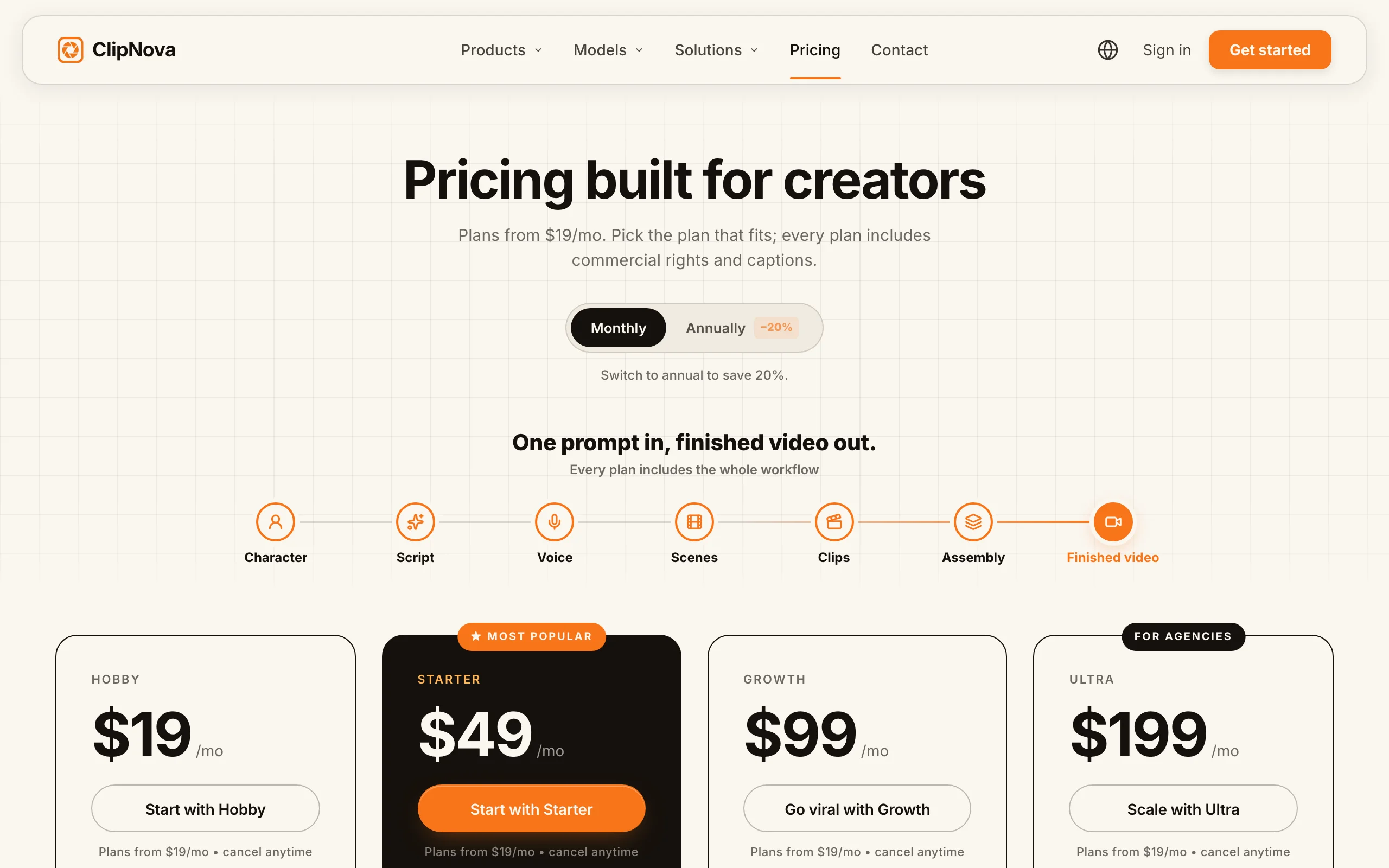
- Hobby $19/mo with 1,000 credits, Starter $49/mo with 2,600, Growth $99/mo with 5,750, Ultra $199/mo with 12,000
- Yearly billing takes 20% off (Hobby works out to $15/mo, Ultra to $159/mo)
- Every plan includes all tools (prompt to video, music to video, avatars, UGC ads), watermark-free 1080p export, and full commercial rights; see ClipNova's plans for the current lineup
Best for
- Creators and faceless channels publishing finished short-form daily who want one predictable bill
- Marketers who need commercial rights and watermark-free exports on the entry plan, not a top tier
Pros
- Lowest effective cost per finished video, since script, voiceover, captions, and music are included in the same generation
- No feature gates: the $19 plan exports the same watermark-free 1080p with commercial rights as the $199 plan
- One subscription replaces separate model, voiceover, and captioning tools
Cons
- Unused monthly credits expire at the end of the billing cycle, like most tools here
- No API for developer workflows
2. Runway pricing, what per-second credits really buy
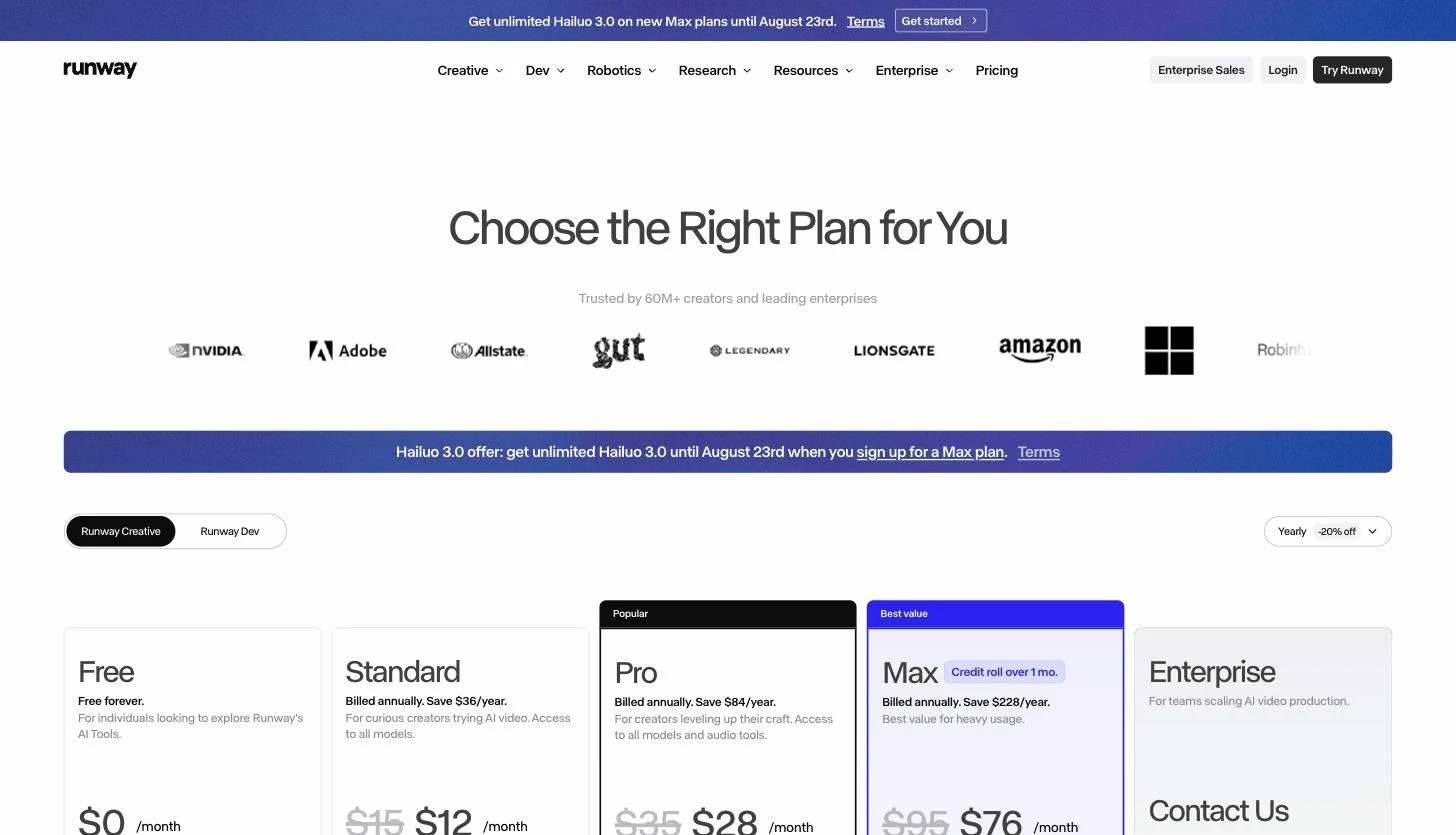
Runway makes some of the best raw AI footage available, and its pricing is the clearest example of per-second credit burn. Plans look cheap: Standard is $12/mo billed annually ($15 monthly) with 625 credits. But Gen-4.5, the model you actually want, costs 60 credits per 5-second clip. That makes Standard roughly 50 seconds of flagship footage a month, before retakes. Pro at $28/mo (annual) with 2,250 credits and Max at $76/mo (annual) with 9,500 credits scale the same math, and Max adds a one-month credit rollover, the only rollover in this comparison.
How the pricing works
- Standard $12/mo, Pro $28/mo, Max $76/mo, all billed annually (about 20% more billed monthly)
- Gen-4.5 costs 60 credits per 5-second generation; heavier models like Aleph 2.0 run 140 credits per 5 seconds
- Watermark-free exports and 4K upscaling from Standard up
Best for
- Filmmakers and editors who treat AI clips as raw material for a real edit
- Teams that can afford Max, where the credit rollover softens the burn model
Pros
- Exceptional footage quality and creative controls for the money at the Pro tier and up
- Transparent per-model credit table, so the cost per clip is at least calculable
Cons
- Iteration is expensive: five takes of one 10-second shot can consume nearly a month of Standard credits
- The subscription buys clips only; scripting, voiceover, captions, and editing are separate costs in other tools
3. Kling AI pricing, the $10 entry point for raw clips
Kling AI (from Kuaishou) has the lowest paid entry in this comparison: Standard at $10/mo with 660 credits. Pro at $37/mo brings 3,000 credits and Premier at $92/mo brings 8,000. First-time subscribers often see steep first-month discounts, which is worth taking, but note the renewal price before you judge the deal.
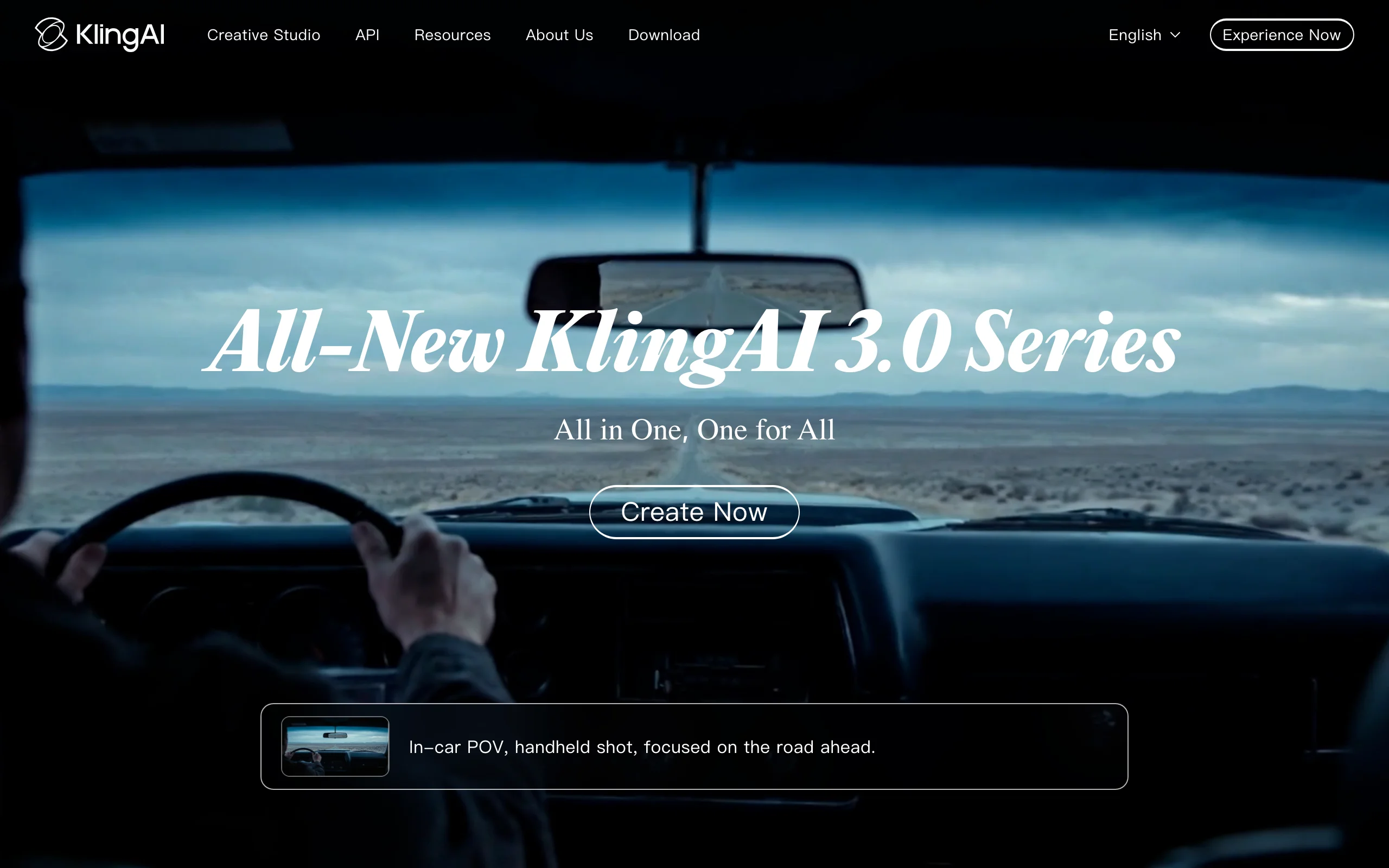
Credit cost per clip varies widely by model version, resolution, and mode, so the effective price per usable clip is harder to predict than the plan price suggests. If you like Kling's motion quality but want it inside a finished-video pipeline, ClipNova hosts Kling as one of its models, and there is a dedicated Kling AI alternative breakdown.
How the pricing works
- Standard $10/mo (660 credits), Pro $37/mo (3,000), Premier $92/mo (8,000), Ultra $180/mo (26,000)
- Annual billing discounts run around a third off on most tiers
- Credit cost per generation depends on model version, length, resolution, and mode
Best for
- Budget-conscious creators generating realistic motion clips to edit elsewhere
Pros
- Cheapest paid subscription in the category
- Strong realism and motion quality per dollar
Cons
- Raw clip generator only, with no script, voiceover, or caption pipeline
- Variable per-clip credit costs and promotional first-month pricing make the real monthly cost hard to forecast
4. Synthesia pricing, per-minute avatar video for training content
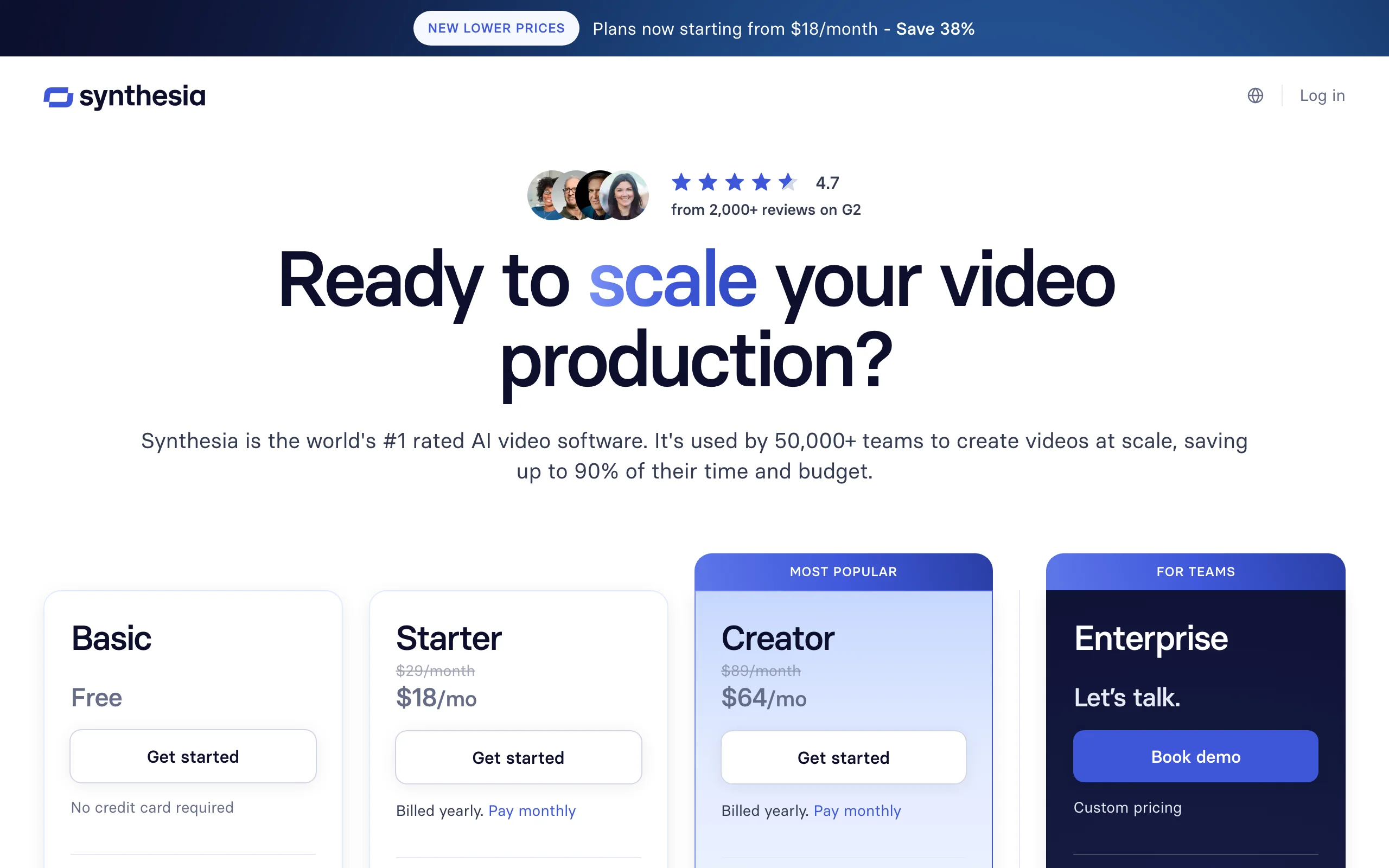
Synthesia is the most predictable pricing in this comparison because it meters finished minutes, not credits. Starter is $29/mo, or $18/mo billed annually, for 10 avatar minutes a month with 125+ stock avatars. Creator at $89/mo ($64 annual) triples that to 30 minutes and adds API access. The per-minute math is easy: about $1.80 to $2.90 per finished minute on Starter. The constraint is scope. Synthesia produces presenter-style avatar videos for training and internal comms, and 10 minutes a month is one or two videos, not a publishing calendar.
How the pricing works
- Starter $29/mo ($18/mo annual): 10 min/mo, logo removal, downloads
- Creator $89/mo ($64/mo annual): 30 min/mo, 180+ avatars, API
- Enterprise: custom pricing with unlimited minutes
Best for
- L&D and internal-comms teams making structured presenter videos
- Buyers who want a predictable per-minute cost instead of a credit meter
Pros
- The clearest, most calculable pricing in the avatar category
- Enterprise-grade localization (140+ languages) when you scale up
Cons
- 10 minutes a month is restrictive for anyone publishing weekly, and overage means a plan jump
- Presenter-format only; not built for organic short-form or cinematic footage
5. HeyGen pricing, avatar credits with a conversion catch
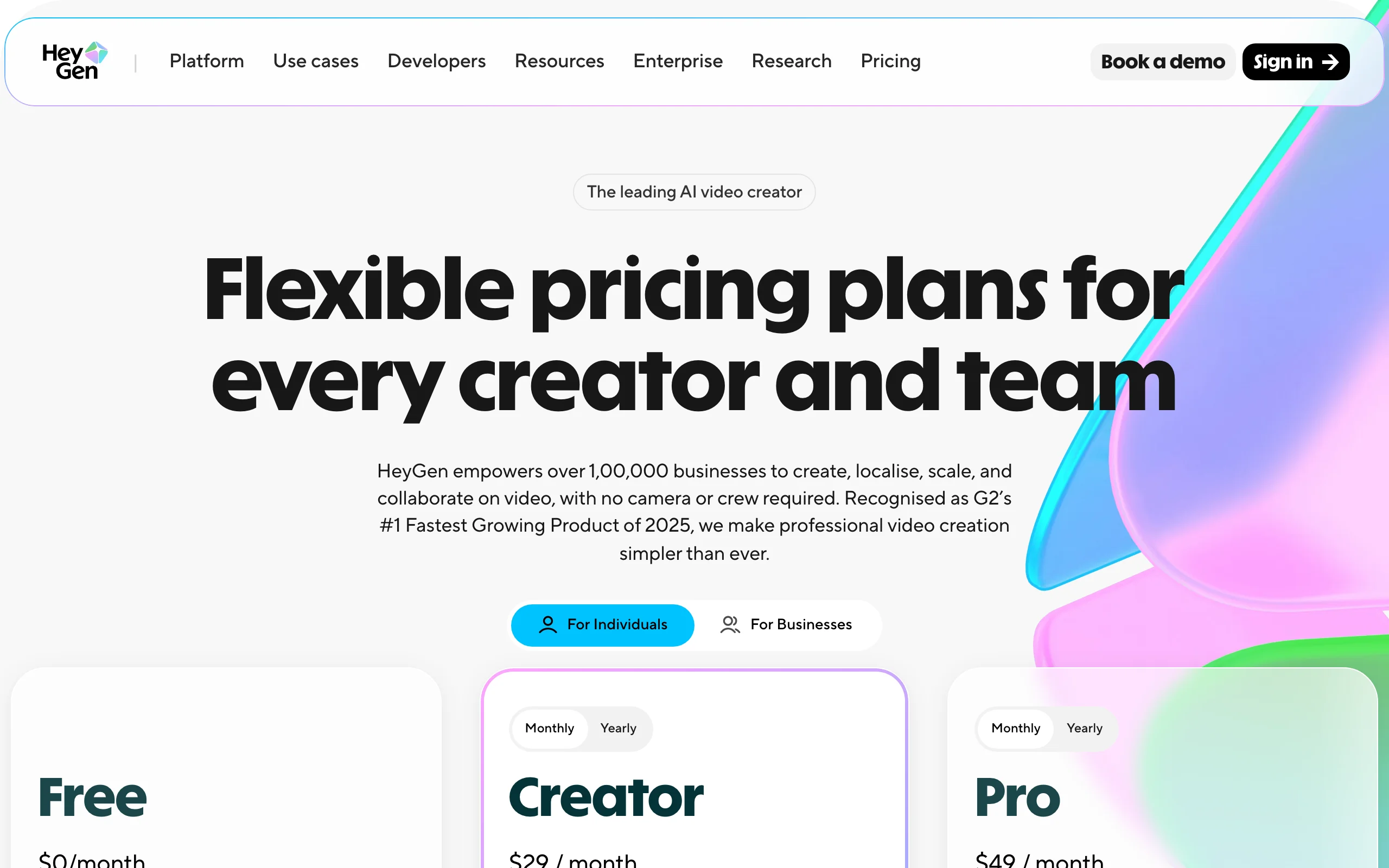
HeyGen prices avatar video through credits rather than minutes, and that indirection is the thing to understand before buying. Creator is $29/mo for 600 monthly credits with the watermark removed and 1080p export; Pro is $49/mo for 1,000 credits and 4K; Business is $149/mo plus $20 per seat for 1,500 credits. The catch: credits convert to minutes at different rates depending on which avatar model you use, and the newest, most realistic avatar generations consume credits several times faster than the older ones. Two users on the same plan can get very different amounts of video. There is a fuller HeyGen alternative comparison if the credit-to-minute conversion puts you off.
How the pricing works
- Creator $29/mo: 600 credits, watermark removed, 1080p, videos up to 30 minutes
- Pro $49/mo: 1,000 credits, 4K export
- Business $149/mo plus $20/seat: 1,500 credits, 60-minute videos
Best for
- Marketing teams making spokesperson videos and translating existing footage with lip-sync
- Brands that need a custom avatar of a real presenter
Pros
- Excellent avatar realism and video translation for the price
- Watermark removal already at the $29 entry plan
Cons
- Credit-to-minute conversion varies by avatar model, so the real output per plan is hard to predict
- Avatar-centric: general text-to-video is secondary, and organic short-form is not the focus
6. InVideo AI pricing, yearly-billed credits for social video
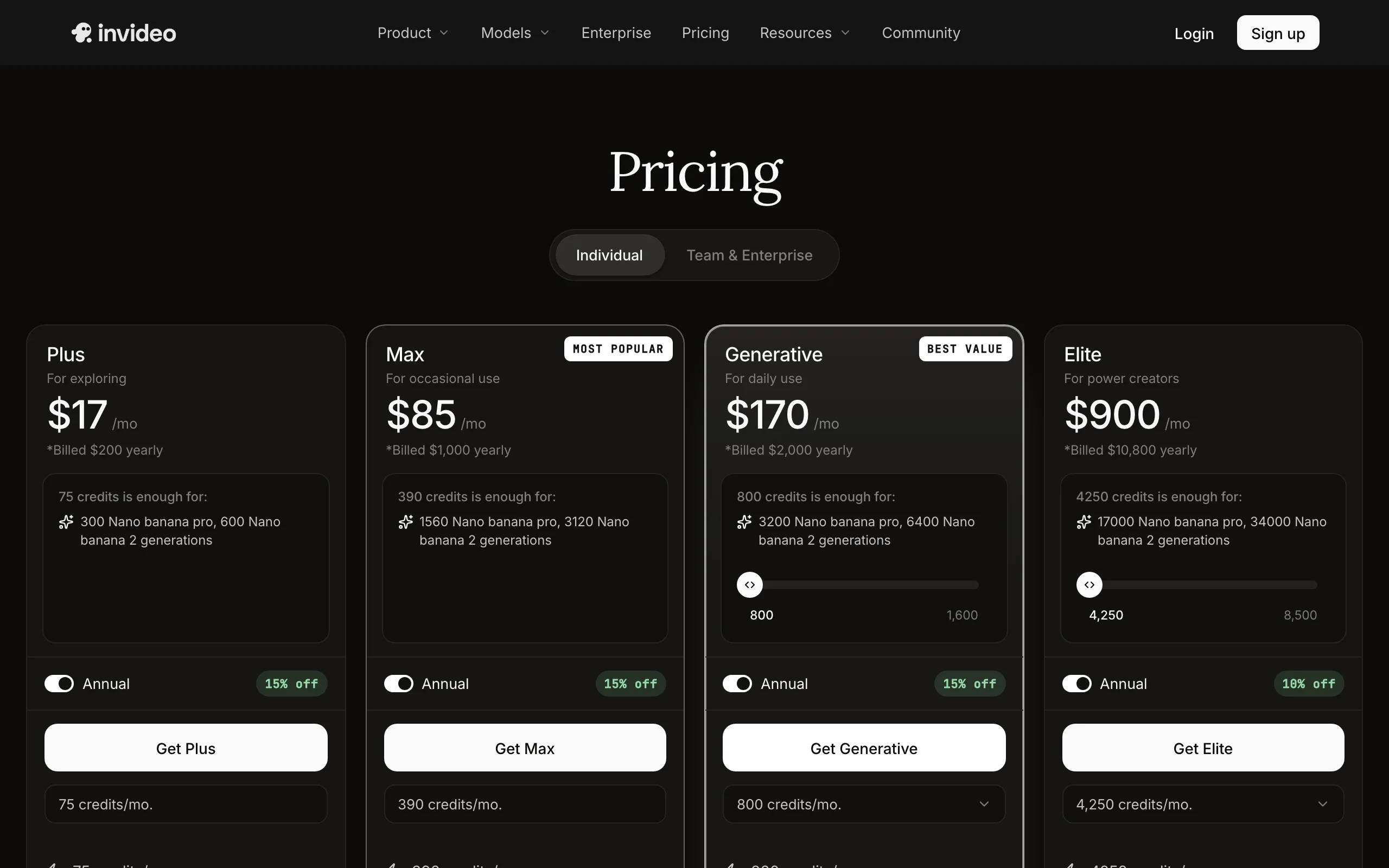
InVideo AI is the closest overlap with ClipNova on paper, prompt-in, social-video-out, but its pricing has shifted to yearly-billed credit plans. Plus is presented as $17/mo but billed at $200/year, with 75 AI credits a month; that annual billing already includes the roughly 15% discount over paying month to month. Max is $85/mo billed at $1,000/year with 390 credits. All paid plans export without watermarks. The credits meter generative AI usage, and stock-heavy videos stretch further than fully generative ones. If you are comparing the two directly, see the InVideo alternative page.
How the pricing works
- Plus: billed $200/year (about $17/mo), 75 credits/mo, 4 AI avatars, unlimited watermark-free exports
- Max: billed $1,000/year (about $85/mo), 390 credits/mo, 16 avatars
- Generative $170/mo and Elite $900/mo for high-volume teams
- Annual prepay saves about 15%
Best for
- Social media managers making template-and-stock-driven videos on a fixed yearly budget
- Teams already invested in InVideo's template library
Pros
- Mature product with a large template and stock ecosystem
- Watermark-free exports on every paid plan
Cons
- Yearly billing on the entry plan is a bigger commitment than the monthly plans elsewhere in this list
- Output leans on stock footage, and fully generative videos consume the small credit allowance quickly
7. Pictory pricing, two quotas you can hit separately
Pictory prices for repurposing, turning blogs, scripts, and long recordings into short videos, and it is the only tool here running two meters at once. Starter is $29/mo (or $25/mo billed annually) and includes 200 video minutes plus 100 AI credits per month. Video minutes cover standard stock-based creation; AI credits pay for the AI-heavy features. That means you can run out of one quota with plenty of the other left, and the plan that looked sufficient on minutes can stall on credits. Professional at $59/mo ($35 annual) and Team at $199/mo ($119 annual) raise both meters. For a generative-first comparison, the Pictory alternative page covers the trade-offs.
How the pricing works
- Starter $29/mo ($25/mo annual): 200 video minutes plus 100 AI credits per month
- Professional $59/mo ($35/mo annual): 600 minutes, 500 AI credits (annual plans quote 12,000/year)
- Team $199/mo ($119/mo annual): 1,800 minutes, 2,400 AI credits
Best for
- Content teams repurposing webinars, podcasts, and blog posts into clips
- Buyers who mostly need stock-based assembly, where the minutes quota stretches far
Pros
- Generous raw minutes for stock-driven video at the entry price
- No watermarks on any paid plan
Cons
- The dual quota (minutes plus AI credits) makes real capacity hard to predict, and AI-heavy workflows drain the smaller credit pool first
- Repurposing tool at heart; generative quality trails prompt-first tools
What happened to Sora pricing
For most of the past year, "how much does Sora cost" had a simple answer: it was bundled into ChatGPT Plus at $20/mo and ChatGPT Pro at $200/mo. That answer is now history. OpenAI discontinued the Sora app and web access on April 26, 2026, removed it from ChatGPT plans, and has scheduled the Sora API to sunset on September 24, 2026.
The model itself is not gone from the market, because multi-model platforms license frontier models and host them behind one subscription. ClipNova includes Sora 2 generation alongside Veo 3, Kling, and others on every plan, which is now the practical way to keep using it; the Sora alternative page covers that route in detail. The broader pricing lesson stands: single-model subscriptions carry platform risk, and a model you budget around can disappear mid-year.
How to test the real cost per video with ClipNova
The only reliable way to compare AI video pricing is to make the same video in each tool and count what it consumed. Run this test in your first month before committing to a bigger tier:
- Go to app.clipnova.io and sign up.
- Open the prompt-to-video tool and paste a real brief from your niche. The exact prompt we used for the example below: "A 30-second vertical explainer on what a daily latte habit really costs in a year, warm cafe visuals, upbeat narrator, bold captions."
- Pick the voice and language (18 available) and keep captions on; they are included on every plan.
- Generate, then check the result: script, narration, visuals, captions, and music arrive in one pass.
- Export in 9:16 for TikTok, Reels, or Shorts. Exports are watermark-free in 1080p with full commercial rights, on every plan.
- Note how much of your credit balance one finished video used, then multiply by your monthly publishing calendar. That number, not the sticker price, is your real cost per month.
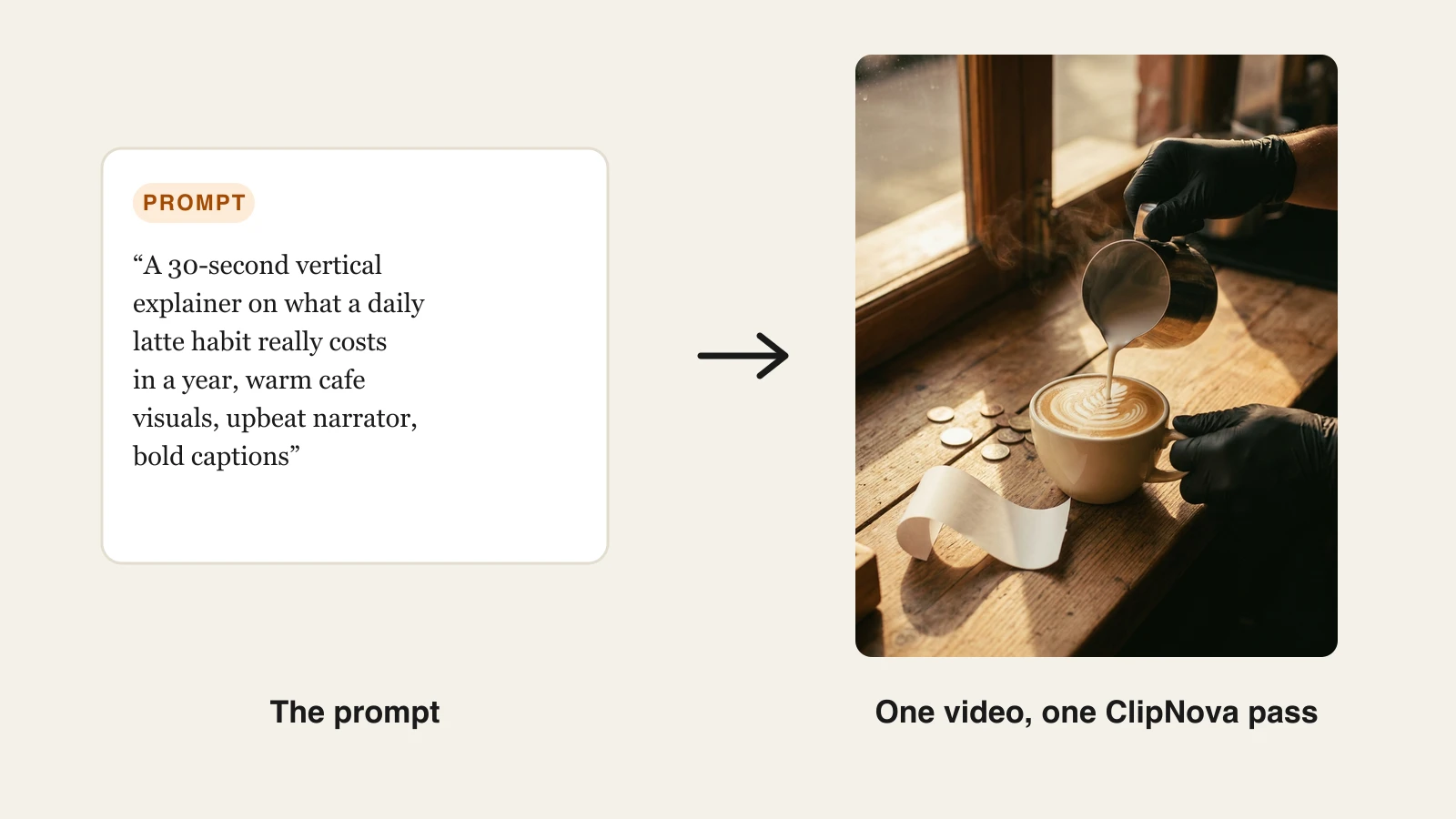
Run the same brief through a raw-clip tool and the difference shows up immediately: you get footage, then still need a script, a voiceover tool, a captioning pass, and an editor before it is publishable. Price the whole pipeline, not the first subscription.
How to choose an AI video plan for your budget
1) Are you buying footage or finished videos?
- If you need publish-ready videos with narration and captions: ClipNova's flat tiers price the whole deliverable, and InVideo AI is the template-driven alternative.
- If you need raw cinematic material for a real edit: Runway and Kling AI are priced for that, but budget for the tools that finish the video too.
2) How many videos will you actually publish per month?
Translate every plan into your calendar before paying. Ten Synthesia Starter minutes is one or two videos. Runway Standard's 625 credits is about 50 seconds of Gen-4.5 before retakes. ClipNova Hobby's 1,000 credits sustains a steady short-form cadence.
3) Which hidden limit would bite you first?
- Watermarks: check which tier removes them; ClipNova exports clean on every plan.
- Credit expiry: assume monthly credits vanish at cycle end everywhere; only Runway Max rolls over, and only for a month.
- Conversion opacity: HeyGen's avatar-model credit rates and Pictory's dual quotas are where plans quietly shrink. Ask what one of your videos costs in the tool's own units before subscribing.
4) Monthly or annual?
Take the annual discount (15% to 40% across these tools) only after a paid month proves the tool fits. This market repriced repeatedly in the past year, one major model lost consumer access entirely, and flexibility has real value. ClipNova's 20% annual discount brings Hobby to an effective $15/mo.
The short version: match the pricing model to your output. If the deliverable is a finished short-form video, a flat-tier, everything-included plan from $19/mo beats assembling the same pipeline from per-second and per-minute subscriptions, and one Hobby month is enough to confirm that math on your own content.
Frequently asked
How much does an AI video generator cost per month?
Entry paid plans run from $10 per month (Kling AI Standard) to around $29 per month (Synthesia and HeyGen), with ClipNova at $19 per month and Runway at $12 to $15 per month. The headline price is only half the story, though. Those plans buy very different things, from about 50 seconds of raw footage on Runway Standard to 10 avatar minutes on Synthesia Starter to a full month of finished, captioned videos on ClipNova Hobby.
How do AI video generator credits work?
Credits are an internal currency that meters how much video you can generate. Each generation deducts credits based on length, resolution, and which model you use, so a premium model can burn credits several times faster than a standard one. Almost everywhere, including ClipNova, unused monthly credits expire at the end of the billing cycle, so match your plan to what you will actually publish rather than buying headroom.
How much does one AI video cost to make?
It depends on what counts as a video. On per-second models like Runway, a single 10-second Gen-4.5 clip costs 120 credits, about a fifth of the Standard plan's monthly 625, and you still need to edit, voice, and caption it elsewhere. On per-minute tools like Synthesia, a minute of avatar video costs about $1.80 to $2.90 on Starter. On ClipNova, one credit budget covers the complete finished video, script, voiceover, captions, and music included, which is why its cost per publishable video is the lowest in this comparison.
Why do AI video generators use credits instead of unlimited plans?
Because every second of AI video costs the vendor real GPU money, and heavy users would make flat unlimited plans unprofitable. Credits let vendors charge light users less and heavy users more without publishing a confusing per-video price. The catch is that credit systems hide the real cost per video, so always translate a plan's credits into finished videos for your specific use case before subscribing.
Do unused AI video credits roll over to the next month?
Usually not. ClipNova, Runway (except its Max plan, which rolls credits over for one month), Kling AI subscriptions, and InVideo AI all expire unused monthly credits at the end of the billing cycle. Treat monthly credits as use-it-or-lose-it when sizing a plan.
How much does Sora cost now?
You can no longer buy Sora directly from OpenAI. The Sora app and web access were discontinued on April 26, 2026, ChatGPT Plus and Pro no longer include it, and OpenAI has scheduled the Sora API to sunset on September 24, 2026. Before the shutdown, access was bundled into ChatGPT Plus at $20 per month and Pro at $200 per month. Multi-model platforms are now the practical way to reach frontier models, and ClipNova includes Sora 2 generation alongside Veo 3 and Kling in one subscription.
Is annual billing worth it for AI video tools?
If you already know the tool fits your workflow, yes, the discounts are real: 20% off at ClipNova and Runway, 15% at InVideo AI, and Synthesia's Starter drops from $29 to $18 per month. If you have not tested the tool on your actual niche yet, start monthly. AI video pricing and models change fast enough that a year is a long commitment, and several vendors repriced mid-cycle in the last year alone.
Which AI video generator gives the most value for the money?
If you publish finished short-form videos, ClipNova. Every plan from the $19 Hobby tier up includes the entire feature set, watermark-free 1080p export, commercial rights, 18-language voiceovers, and access to hosted frontier models, with plans differing only in monthly credits. Raw-clip tools can look cheaper per month but leave you paying separately for editing, voiceover, and captions. One Hobby month at $19 is enough to check the math on your own content.