Yes, you can use AI-generated video commercially, but only if the plan you generated it on grants commercial rights. Every AI video generator handles this differently: ClipNova includes full commercial rights on every plan starting at $19 a month, Runway's terms place no commercial restriction on outputs at all, while Kling AI, Luma, Pika, and HeyGen attach the commercial license to a specific paid tier. The safe rule is simple: check the tier you generated on, not just the tool.
Getting this wrong is expensive. A demonetized channel, a pulled ad, or a client dispute over a watermarked deliverable costs far more than the plan upgrade would have. A no-watermark AI video generator with rights on every plan avoids that problem from day one.
This guide compares 7 AI video generators on exactly one axis: what their terms actually say about commercial use, as of August 2026. You get the rights rules per tool and tier, watermark policies, what YouTube and TikTok require before you monetize, and a decision framework at the end.
AI video generators with commercial rights: a brief overview
- ClipNova: Best overall for commercial AI video. Full commercial rights and watermark-free 1080p export on every plan, including the $19 Hobby tier, so there is no rights upgrade to buy later.
- Runway: Most permissive written terms. Runway's terms of use claim no ownership of outputs and place no restriction on commercial use, on any tier.
- Google Veo 3.1: Best frontier-model quality, murkiest consumer licensing. Google claims no ownership of generations, but visible watermarks and plan-dependent rules need reading before client work.
- Kling AI: Cheapest clean commercial license for realistic clips. One paid membership from about $10 a month removes the watermark and unlocks commercial use.
- Luma Dream Machine: Clearest rights vesting. Its licensing guide states commercial rights acquired on a paid generation stay with that asset permanently, even if you later downgrade.
- Pika: Cheapest tool to try, priciest jump to commercial. Fun clip generation from $8 a month, but commercial use and watermark removal sit on the $28 to $35 Pro tier.
- HeyGen: Clearest paid-tier ownership for avatar ads. Its July 2026 terms spell out that paid-plan outputs can be sold, monetized, and used in ads.
| Tool | Commercial rights from | Price for commercial use | Watermark-free from |
|---|---|---|---|
| ClipNova | Every plan | From $19/mo | Every plan, 1080p |
| Runway | All tiers per terms | From $12/mo (yearly) for clean files | Standard |
| Google Veo 3.1 | No ownership claim by Google | $19.99/mo (Google AI Pro) | AI Ultra in Flow, or API |
| Kling AI | Any paid membership | From about $10/mo | Any paid plan |
| Luma Dream Machine | Plus and above | About $30/mo | Plus |
| Pika | Pro plan | $28/mo yearly, $35 monthly | Pro |
| HeyGen | Any paid plan | From $29/mo | Creator |
Reading the table: "commercial rights from" is the tier named in each vendor's terms or licensing pages as of August 2026. Terms change often in this category, so recheck the linked source before a big campaign.
What commercial rights actually mean for AI video
Commercial rights in AI video are a license question, not a copyright question. When a vendor grants commercial rights, it is promising not to enforce its own terms against you for monetizing the output: running it as an ad, putting it in client work, or earning revenue from it on YouTube or TikTok.
Three distinctions matter before you buy:
- License vs ownership. Most tools either assign you their rights in the output (OpenAI-style assignment, HeyGen paid plans) or disclaim ownership entirely (Runway, Google). Separately, the US Copyright Office's position is that purely AI-generated footage is not copyrightable, so you can use it commercially but may not be able to stop someone else from reusing it. Human-added elements like your script, voiceover, and edit are protectable.
- Tier-gated rights. The most common trap: the tool allows commercial use, but only from a specific plan. Kling, Luma, Pika, and HeyGen all name the plan where commercial use starts. A video generated below that tier usually stays personal-use forever, even if you upgrade later.
- Watermarks and provenance. A visible watermark is a practical block on commercial use even where the license allows it. Separately, most major models now embed invisible provenance metadata (C2PA on Runway, SynthID on Veo), which platforms like TikTok read to auto-label content as AI-generated. That metadata is not a rights problem, but it does affect how your video is presented.
With that framing, here is what each tool's terms actually say.
1. ClipNova, best overall for commercial AI video
ClipNova removes the tier-checking problem this whole article exists to solve: every plan carries full commercial rights and watermark-free export, including the cheapest one. The comparison table on ClipNova's pricing page lists commercial rights as a ticked row across Hobby, Starter, Growth, and Ultra, alongside watermark-free 1080p export on all of them. There is no separate license tier to unlock before you can monetize, run ads, or deliver to a client, whether the deliverable is a narrated video or a UGC ad that keeps the same creator face and the same product from one version to the next.
For anyone running paid media or client campaigns, that makes ClipNova a source of finished video ads with the same face and the same product in every version, each one licensed the moment it renders.
- Finished: a creator photo and a product photo become a scripted, voiced, lip-synced and captioned UGC ad, and a product photo alone becomes an animated ad clip with music, both cleared for paid placements on every plan.
- Same face, same product: reuse one creator photo (with that person's consent) or a saved Talking Avatar and the spokesperson matches across the campaign, while the product keeps its shape, colours and label as in your photo.
- More versions to test: re-run a UGC ad in another tone or at 15 to 45 seconds, pick 9:16, 16:9 or 1:1 per platform for product clips, and every version carries the same rights.
That matters more here than in most categories because ClipNova outputs finished commercial assets, not raw clips. A prompt returns a complete video with script, voiceover, visuals, captions, and music, ready to run as a TikTok ad or publish on a monetized channel the same day. And because ClipNova hosts the top video models internally (Sora 2, Veo, Kling, and more on the models hub), you generate with frontier models under one subscription and one set of rights, instead of juggling four vendors' license tiers.
How to make a commercially safe ad with ClipNova
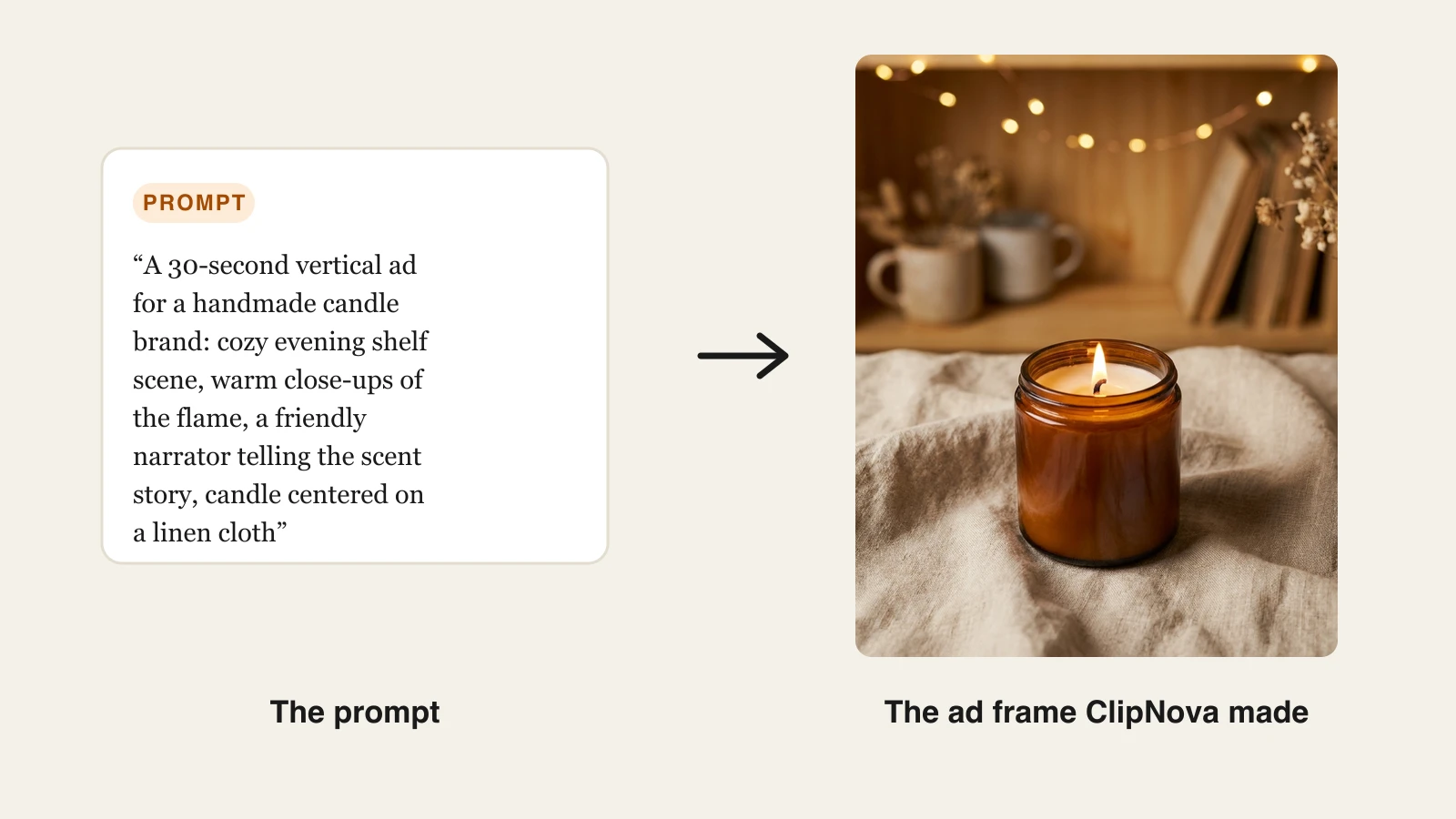
Here is the exact workflow behind the example image below:
- Go to app.clipnova.io.
- Open AI Video Studio and pick prompt-to-video, or choose a specific hosted model from the models list.
- Paste a prompt describing the finished ad. The one used here: "A 30-second vertical ad for a handmade candle brand: a cozy evening shelf scene, warm close-ups of the flame and wax texture, a friendly narrator telling the scent story, ending on the candle centered on a linen cloth."
- Pick the voice (18 languages available) and keep captions on; ads on mute need them.
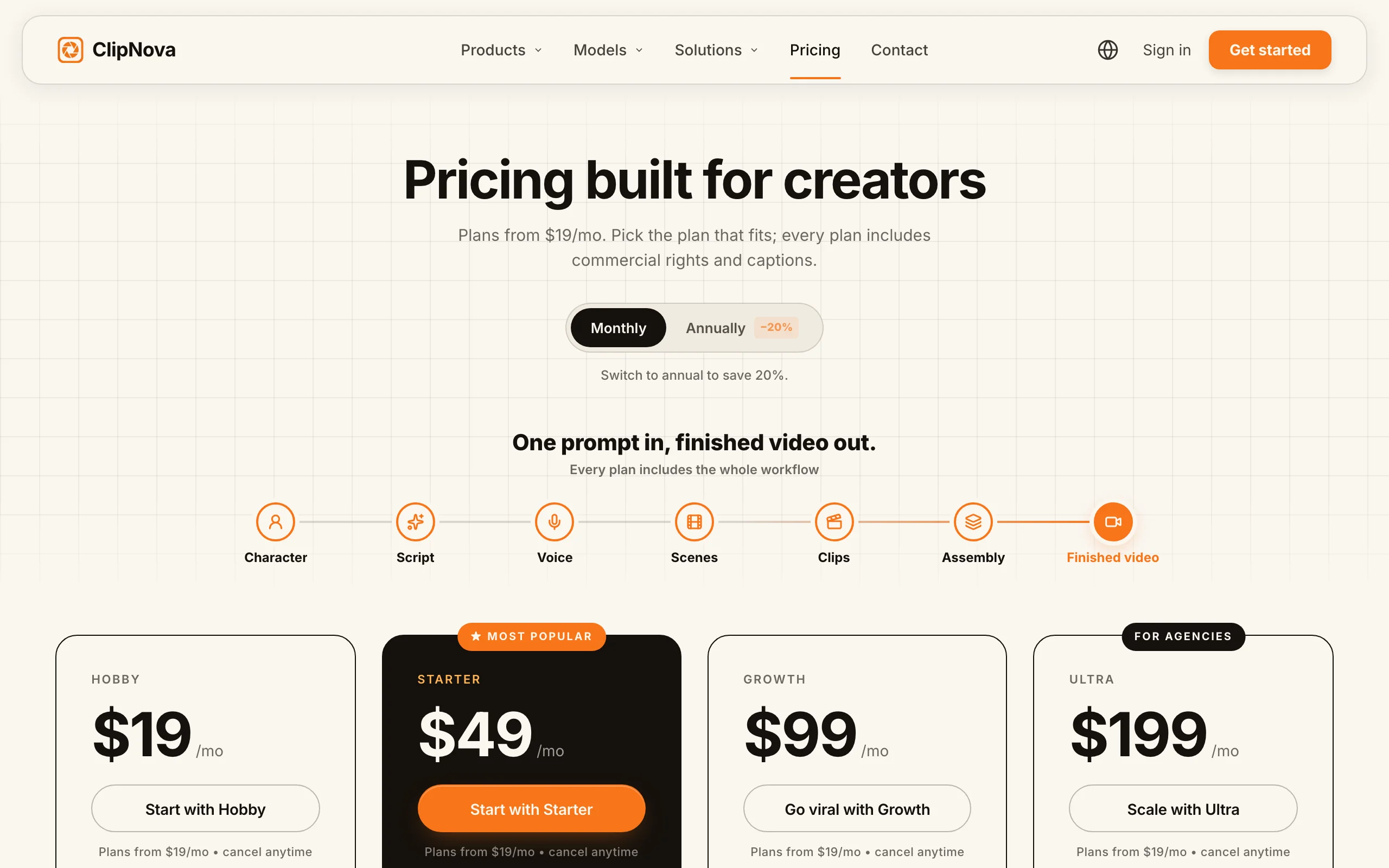
- Pick vertical for TikTok and Reels or 16:9 for YouTube before you generate (the ratio is set per video), then generate. Every export is watermark-free with commercial rights included, on any plan.
Commercial rights and watermarks
- Full commercial rights on every plan, listed plan-by-plan on the pricing page
- Watermark-free 1080p export on every plan, including Hobby
- One rights regime across all hosted models, no per-model license reading
Pricing
- Hobby $19/mo (1,000 credits), Starter $49/mo (2,600 credits)
- Growth $99/mo (5,750 credits), Ultra $199/mo (12,000 credits); every plan has the full feature set, and yearly billing is 20% off
Pros
- The cheapest full commercial license in this list at $19/mo, with no watermark asterisk
- Output is a finished, publishable ad or video, so the rights cover the whole deliverable, not just a raw clip
Cons
- Newer brand than Runway or HeyGen, with a shorter legal track record for enterprise procurement teams to review
- Credits are consumed per generation, so heavy ad-variation testing fits the higher tiers better
2. Runway, most permissive written terms
Runway has the cleanest rights language of any major AI video vendor. Its terms of use, updated May 11, 2026, state that the company "does not claim ownership of any of your Inputs or Outputs" and "does not restrict your commercial use of your Outputs." No tier qualifier, no carve-out. The practical limit sits elsewhere: watermark-free export starts on the Standard plan.
The trade-off to weigh is data usage: the same terms grant Runway a perpetual right to use your inputs and outputs to train its models (Enterprise excepted). For most creators that is acceptable; for agencies handling confidential client footage it is a real consideration.
Commercial rights and watermarks
- Terms claim no ownership of outputs and place no restriction on commercial use, on any tier
- Clean, watermark-free files start on Standard
- All outputs embed C2PA provenance metadata identifying them as AI-generated
- Non-Enterprise content can be used to train Runway's models
Pricing
- Standard $12/mo billed yearly ($15 monthly, 625 credits), Pro $28/mo yearly, Max $76/mo yearly
Pros
- The strongest written commercial-use position in the category, useful when a client's legal team asks for the clause
- Frontier-quality footage with pro controls for ad and film work
Cons
- Outputs are raw clips: script, voiceover, captions, and assembly are still your job before anything is monetizable
- Training-by-default on your content is a blocker for confidential client work below Enterprise
3. Google Veo 3.1, best frontier quality, read the watermark rules
Veo 3.1 produces some of the most convincing footage in the category, and Google's terms of service (effective July 30, 2026) state that "Google won't claim ownership over" content you generate. What Google does not publish for consumer plans is an explicit plan-by-plan commercial license like HeyGen's or Luma's, so the rights picture is permissive but less contractually specific than the other tools here.
The concrete gotcha is watermarking. Every Veo video carries an invisible SynthID watermark, and most consumer-tier outputs also carry a visible watermark; Google removes the visible mark only for AI Ultra subscribers working in Flow, and for API access. Businesses that need contractual cover typically go through Vertex AI, where Google offers indemnification for generated content.
Commercial rights and watermarks
- Google's terms claim no ownership of generated content
- Visible watermark on most consumer outputs; removed for AI Ultra in Flow and via the API
- SynthID invisible watermark on every generation, which platforms can detect
- Enterprise indemnification is available through Vertex AI, not consumer plans
Pricing
- Google AI Pro $19.99/mo includes Veo 3.1 generation with monthly Flow credits
- Google AI Ultra (higher tiers, pricing varies by region and promo) lifts limits and the visible watermark in Flow
Pros
- Class-leading realism and physics for cinematic ad shots
- Cheap entry at $19.99/mo to test frontier quality
Cons
- The visible watermark on non-Ultra consumer output rules out most polished commercial use at the $19.99 tier
- No explicit consumer commercial-license text, which some client legal reviews will flag
4. Kling AI, cheapest clean commercial license for realistic clips
Kling AI gates rights the way most Chinese and budget-tier vendors do: any paid membership removes the watermark and unlocks commercial use. With Standard memberships starting around $10 a month, it is the cheapest way in this list to get a clean, commercially usable realistic clip generator. One caveat on sourcing: Kling serves its terms regionally and they are not reliably reachable from every country, so the rights summary here is corroborated from multiple current third-party guides rather than a single canonical terms URL.
Commercial rights and watermarks
- Any paid membership removes the watermark and permits commercial use
- Terms are served regionally; archive the version you accepted if you do client work
Pricing
- Standard membership from about $10/mo; Pro and Premier tiers add credits and priority queue
Pros
- The lowest price in this list for watermark-free clips with commercial permission
- Strong realistic human motion for the money
Cons
- Raw clip generator: no script, voiceover, or caption pipeline toward a finished commercial asset
- Regionally served terms and billing make legal diligence harder for Western agencies
5. Luma Dream Machine, clearest rights vesting
Luma publishes the most creator-friendly rights mechanic in the category. Its official Dream Machine licensing guide (updated May 28, 2025) draws a hard line: Lite generations are "for personal use only" with a permanent watermark that survives later upgrades, while Plus and above include "commercial usage rights with no watermark." The standout clause: commercial rights acquired for a specific generation are "permanently vested in those assets," so a video you made on Plus stays commercially usable even after you cancel.
Commercial rights and watermarks
- Lite: personal use only, permanent watermark, and broader data rights granted to Luma
- Plus, Unlimited, and Enterprise: commercial rights, no watermark
- Rights vest per generation and survive subscription changes
Pricing
- Commercial rights start on Plus at about $30/mo
- Luma restructured plans in March 2026 (Plus, Pro, Ultra on the new lineup), so confirm the current tier names at checkout
Pros
- Generation-vested rights are the cleanest answer in this list to "what happens if I cancel"
- Strong image-to-video quality for product and b-roll shots
Cons
- Lite-tier watermarks are permanent: you cannot upgrade your way into rights on an existing clip, only regenerate it
- Mid-2026 pricing restructure makes plan comparison confusing, and clips remain raw footage
6. Pika, cheapest to try, priciest jump to commercial
Pika is the fun end of AI video: effect templates, image animation, and quick social clips from $8 a month billed yearly. The rights ladder is the catch. As of mid-2026, watermark-free downloads and commercial use sit on the Pro plan at $28/mo yearly or $35 monthly, so the gap between "playing with Pika" and "allowed to run it as an ad" is the widest jump in this list relative to the entry price. Pika's terms are served inside its web app rather than as a crawlable public page, so as with Kling, the summary here leans on current third-party documentation.
Commercial rights and watermarks
- Standard tier: watermarked output, personal use
- Pro: watermark-free downloads and commercial use
- Watermarks persist through edits; regenerate on Pro for clean files
Pricing
- Standard $8/mo billed yearly ($10 monthly)
- Pro $28/mo billed yearly ($35 monthly), the minimum for commercial work
Pros
- Lowest entry price in the list to learn and experiment
- Effect templates produce genuinely fun social clips fast
Cons
- Commercial use costs 3.5x the entry tier, which surprises upgraders
- Short raw clips only, with no narration or caption pipeline
7. HeyGen, clearest paid-tier ownership for avatar ads
For spokesperson-style marketing video, HeyGen's terms (updated July 23, 2026) are a model of clarity. On paid plans, "you own all rights in your User Input or User Output," and outputs "may be sold, sublicensed, redistributed, monetized." If avatar ads are your main deliverable, HeyGen's paid tiers give you unambiguous language to show a client; if you want the same clarity with full video generation around it, compare the HeyGen alternative route.
Commercial rights and watermarks
- Paid plans: full ownership of outputs, explicit permission to sell and monetize
- Avatar likeness rules still apply: using a real person's likeness needs their consent regardless of plan
Pricing
- Creator from $29/mo removes the watermark and carries the commercial license
Pros
- The most explicit paid-tier ownership language in this comparison, ideal for client contracts
- Excellent avatar realism and translation for localized ad campaigns
Cons
- Avatar-centric scope: general text-to-video b-roll is secondary
- Credit and minute caps mean high-volume ad testing climbs tiers quickly
Can you monetize AI video on YouTube and TikTok?
Yes, on both platforms, and neither bans AI content. What they regulate is authenticity and disclosure.
YouTube. AI-generated videos are eligible for monetization. On July 15, 2025, YouTube renamed its "repetitious content" monetization rule to "inauthentic content," targeting mass-produced, low-transformation uploads. The test is not whether AI made the video; it is whether the video has original value added, your script, your voice or narration choices, your editing and premise. Separately, YouTube requires a disclosure toggle when realistic content was synthetically generated or altered. A faceless channel running original AI-made explainers with proper rights clears both bars; 40 near-identical template videos do not.
TikTok. TikTok allows AI content but requires labeling of AI-generated material that realistically depicts people, places, or events, across organic posts and ads. It also reads C2PA provenance metadata (the kind Runway and Veo embed) to auto-apply AI labels even when creators skip disclosure, and auto-applied labels cannot be removed. Unlabeled realistic synthetic media risks removal or reduced distribution. Stylized and obviously artistic content, like anime looks, is carved out on the organic side.
For both platforms, the vendor-side rights still come first: platform policy cannot cure a video you never had a commercial license to monetize. Clear the license at the tool tier, then meet the platform's disclosure rules.
How to choose an AI video generator for commercial use
1) Is the deliverable a finished video or a raw clip?
- If you need something publishable or sellable as-is (an ad, a monetized short, client content): ClipNova outputs the finished asset with the rights attached, and its AI UGC generator covers UGC ads you can re-run in another tone or length.
- If you are cutting AI footage into a larger edit you control: Runway or Veo for quality, Kling for budget, with rights handled per the tiers above.
2) What does the commercial license actually cost per month?
Compare license floors, not entry prices: ClipNova $19, Kling about $10 (clips only), Runway $12 yearly for clean files, Pika $28 yearly, HeyGen $29, Luma about $30, Veo effectively Ultra-tier for watermark-free consumer output. Pika and Luma look cheapest until you price the tier that is actually allowed in an ad.
3) How much rights scrutiny will the work face?
- Client and agency work that legal teams review: HeyGen's explicit ownership clause, Runway's no-restriction clause, or Vertex AI's indemnified Veo route give you quotable language.
- Your own channels: any tool's commercial tier is fine; keep a dated screenshot of the terms you relied on, since this category rewrites terms every few months.
4) Are you monetizing on platforms or selling the file?
- Platform monetization (YouTube, TikTok): prioritize originality per upload and disclosure compliance; watermarked videos are the fastest way to look inauthentic.
- Selling or licensing the file itself: prefer tools that assign or vest rights explicitly (HeyGen paid, Luma Plus, ClipNova), since purely AI-generated footage has thin copyright protection and the contract terms are what you are really selling under.
Before committing a campaign to any tool, generate one real deliverable on the tier you intend to pay for, export it, and check the file for watermarks and metadata. Ten minutes of testing beats a takedown after launch.
Related reading: Best AI video generators for business in 2026.
Frequently asked
Can I use AI-generated video commercially?
Yes, if the plan you generated it on grants commercial rights. ClipNova includes commercial rights on every plan, Runway's terms place no commercial restriction on outputs, and Kling AI, Luma, Pika, and HeyGen attach the commercial license to a specific paid tier. Always check the tier you actually generated on, since rights usually do not apply retroactively to videos made on a lower tier.
Can I monetize AI videos on YouTube?
Yes. YouTube's monetization policies do not ban AI-generated video; the July 2025 "inauthentic content" update targets mass-produced, repetitive uploads regardless of how they were made. To stay eligible, add original value with your own script, narration choices, and premise, use YouTube's disclosure toggle for realistic synthetic content, and make sure the generator's plan gave you commercial rights in the first place.
Do I need to label AI-generated videos on TikTok?
You need to label AI content that realistically depicts people, places, or events, in both organic posts and ads. TikTok also reads C2PA provenance metadata embedded by tools like Runway and Google Veo and auto-applies AI labels that cannot be removed. Clearly stylized content, such as anime looks, is exempt on the organic side, but unlabeled realistic synthetic media risks removal or reduced reach.
Do I own the copyright to AI-generated videos?
Usually you own or are assigned the vendor's rights in the output, but under current US Copyright Office guidance, purely AI-generated footage is not copyrightable. That means you can use it commercially, yet you may not be able to stop others from reusing the raw generation. Your script, voiceover, editing, and other human-authored elements are protectable, which is one reason finished videos are safer commercial assets than raw clips.
Which AI video generator includes commercial rights on the cheapest plan?
ClipNova has the lowest full-featured commercial entry point: every plan, including the $19/mo Hobby tier, carries full commercial rights and watermark-free 1080p export. Kling AI's paid memberships from about $10/mo are cheaper but cover raw clips only, with no script, voiceover, or caption pipeline. Pika, HeyGen, and Luma all price their commercial tiers at $28 to $35 a month.
What happens to my commercial rights if I cancel my subscription?
It depends on the vendor. Luma's licensing guide states commercial rights are permanently vested in generations made on a paid plan, and Pika users similarly retain rights to videos generated while subscribed. New generations made after cancellation no longer carry the paid-plan rights. Keep dated exports and a copy of the terms you relied on for anything running in client work or ads.
What is the best AI video generator for commercial use?
If you want finished, monetizable videos without reading license tiers, ClipNova is the strongest pick: full commercial rights on every plan from $19/mo, watermark-free 1080p export, and complete videos with script, voiceover, and captions rather than raw clips. It also hosts top models like Sora 2, Veo, and Kling under one subscription, so one rights regime covers everything you generate.