To make an Amazon or Etsy listing video with AI, you upload a clear product photo to a generator like ClipNova, describe the motion you want, and generate one clip in each marketplace's format: a 16:9 clip at 1080p for your Amazon detail page, and a 5 to 15 second silent loop for your Etsy listing. No camera, no studio, no editor. The generation itself takes minutes, and one product photo covers both marketplaces.
The catch is that Amazon and Etsy want very different videos. Amazon expects a landscape demo that survives a compliance review, while Etsy wants a short, soundless loop that sells texture and craft at a glance. Upload the wrong format and you either get rejected or waste the slot.
This guide covers the current video specs for both marketplaces, then walks through the exact ClipNova workflow from product photo to upload-ready files. If you want the broader craft of scripting and pacing product videos, our guide on how to make a product video with AI pairs well with this one.
Why a listing video is worth the upload slot
A photo gallery answers what a product looks like. A video answers the questions that actually block a purchase: how big it is next to real objects, how the material catches light, how it moves, opens, pours, or fits. That is why both marketplaces gave video a place directly inside the listing gallery, where buying decisions happen.
Video also works harder on mobile, where most marketplace browsing happens. A short clip holds a thumb-scroller longer than any still, and on Etsy a moving thumbnail stands out in a grid of static photos.
The historical blocker was production cost. A single studio product shoot can cost more than a year of an AI subscription, which made video uneconomical for sellers with dozens of listings. AI generation removes that math problem: once one product photo can become a listing video in minutes, every listing can have one.
Amazon product video requirements in 2026
On Amazon, your video appears in the image block on the product detail page, as the last tile in the carousel with a play button, and in the video section further down the page. It sits at the exact moment a shopper is comparing you against the row of competitors below, which makes it the highest-leverage media slot on the listing.
Here is what Amazon requires for detail page videos:
- Access: you need to be enrolled in Brand Registry to add videos to your own listings. Upload in Seller Central under Catalog, then Upload and Manage Videos, and attach the video to your ASIN.
- Format: MP4 or MOV, with a file size up to 5 GB.
- Resolution and ratio: 16:9 landscape is strongly preferred. The minimum is 1280x720, and 1920x1080 is recommended.
- Thumbnail: you upload a cover image as a JPEG or PNG, ideally matching the video's resolution.
- Review: Amazon moderates every video before it goes live, typically within 24 to 72 hours.
The content rules matter as much as the file specs, because they are the most common rejection reasons:
- No pricing, promotions, discount claims, or anything time-sensitive.
- No references to other sellers, marketplaces, or off-Amazon destinations.
- No customer reviews or star ratings shown on screen.
- Show only the product the listing actually sells, in the variations available on that listing.
There is no hard length cap for detail page videos, but 15 to 60 seconds is the practical range: long enough to demonstrate the product, short enough that shoppers finish it. Put the strongest visual in the first three seconds.
One planning note: if you later reuse the video for Sponsored Brands ads, those have their own spec (6 to 45 seconds, up to 500 MB, H.264). A 30 to 40 second listing video edits down into an ad cut without regenerating anything.
Etsy listing video requirements in 2026
On Etsy, the video lives inside your listing's photo gallery and plays automatically, on a loop, with no sound. Etsy strips the audio from every upload, so voiceovers and music are wasted effort here. The clip has one job: make the product feel real and handmade in a few silent seconds.
Etsy's current specs:
- Length: 5 to 15 seconds. Longer uploads get trimmed in the editor, so plan the loop short.
- Resolution: at least 500px, with 1080px or higher recommended.
- Aspect ratio: square, portrait, and landscape all work, anywhere between 2:1 and 1:2. Square or vertical fills more of the screen on mobile.
- File: under 100 MB. MP4 with the H.264 codec processes most reliably, though MOV and other common formats are accepted.
- Audio: removed automatically on upload.
- Access: every seller can add listing videos; no program enrollment needed.
Because the video is silent and small on screen, composition does the selling. Slow, deliberate motion reads better than fast cuts: a rotation, a push-in on texture, hands placing the item into a styled scene. Keep any text overlays away from the very top and bottom of the frame, where Etsy's interface elements like the favorite button can cover them.
One honesty rule applies on both marketplaces: the video must accurately show the item you ship. With AI-generated scenes, that means checking every frame against your real product and regenerating anything where the AI drifted on shape, color, or detail.
| Spec | Amazon detail page | Etsy listing |
|---|---|---|
| Aspect ratio | 16:9 landscape preferred | Square to vertical, between 2:1 and 1:2 |
| Length | No hard cap; 15 to 60 seconds works best | 5 to 15 seconds |
| Resolution | 1280x720 minimum, 1920x1080 recommended | 500px minimum, 1080px+ recommended |
| File | MP4 or MOV, up to 5 GB | MP4 (H.264) safest, under 100 MB |
| Audio | Allowed, but most shoppers watch muted | Removed automatically |
| Who can upload | Brand Registry sellers | Every seller |
| Goes live | After review, about 24 to 72 hours | After processing |
How to make Amazon and Etsy listing videos with ClipNova, step by step
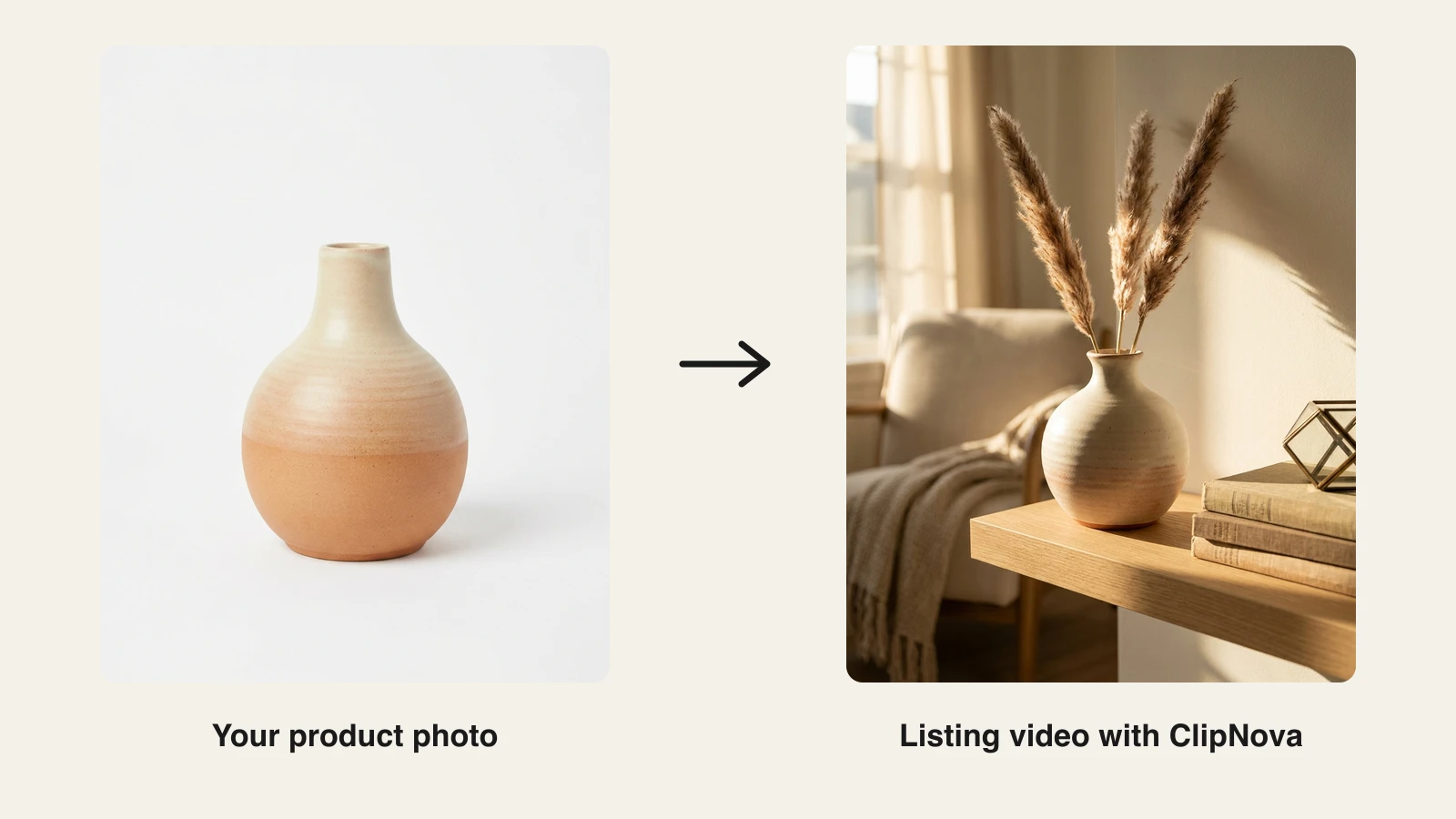
The fastest route from product photo to both formats is the ClipNova AI product video generator. You feed it one photo and a short brief, and it animates your product into one clip with timed beats and music, keeping your product's shape, colours and label as in the photo. For a seller with a growing catalog, that means finished listing and ad videos with the same product in every version, and a fresh take whenever you want another one to test. Here is the full workflow, using a handmade ceramic vase as the example.
Before you open the tool, gather three inputs: your sharpest product photo, the two or three details buyers ask about most (size, material, how it is made), and a sense of the setting where the product lives. Those three things become your brief, and a specific brief is the difference between a generic clip and a scene that looks like your brand.
-
Sign up at app.clipnova.io. Every plan includes the full feature set, so the Hobby tier is enough to test with.
-
Open the AI product video generator and upload your best product photo. Use the sharpest, cleanest shot you have, ideally on a plain background with even light. If your only shot is cluttered or dim, clean it up first with one of these AI photo editors for sellers. The photo is the anchor for every generated scene, so its quality sets the ceiling.
-
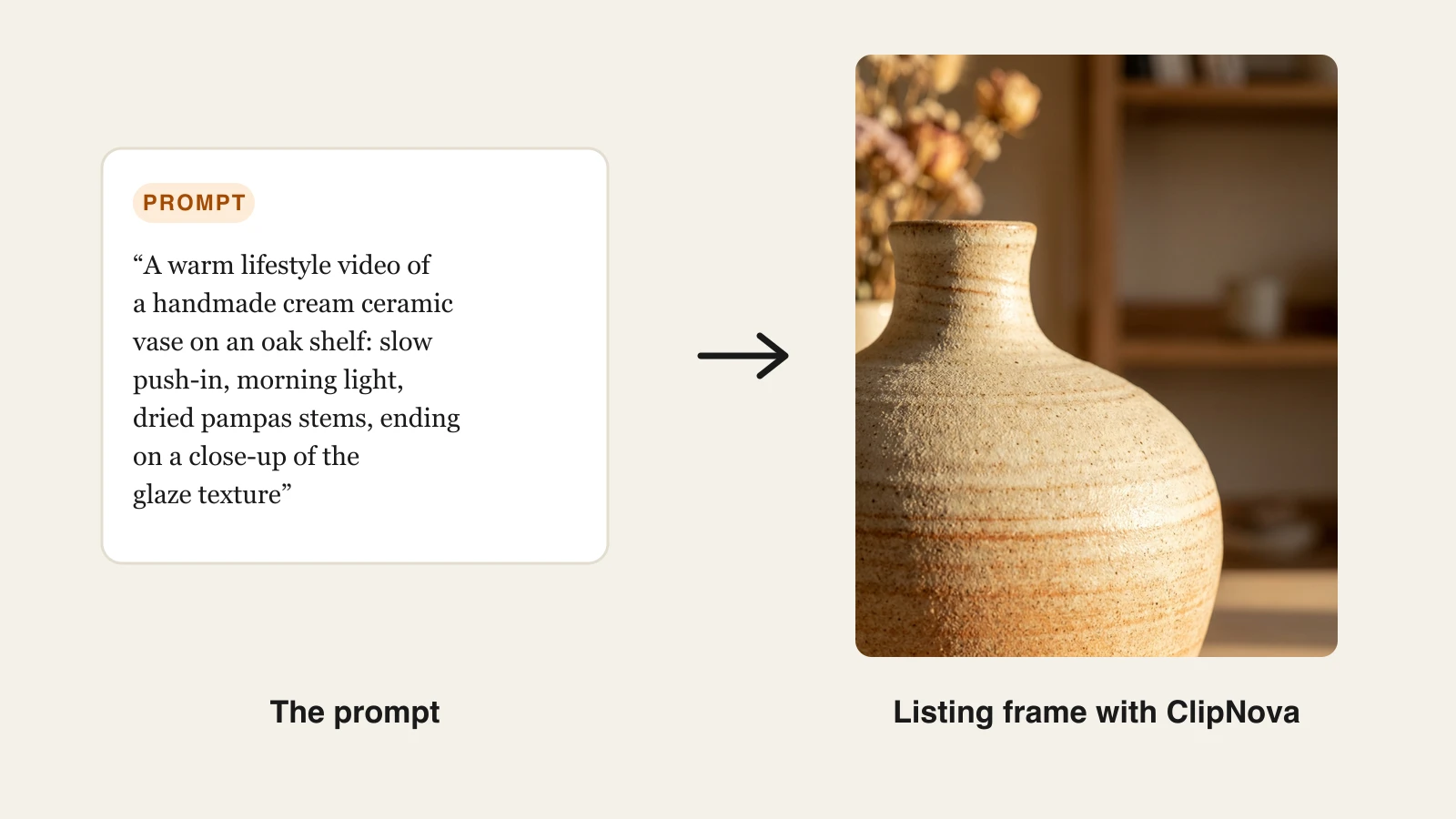
Describe the video you want. One or two specific sentences beat a vague brief. This is the exact prompt used for the vase example below:
-
Review the generated clip. Check it frame by frame against the real product: glaze color, proportions, details. Regenerate if the AI drifted anywhere, because marketplace media has to show the item you actually ship.
-
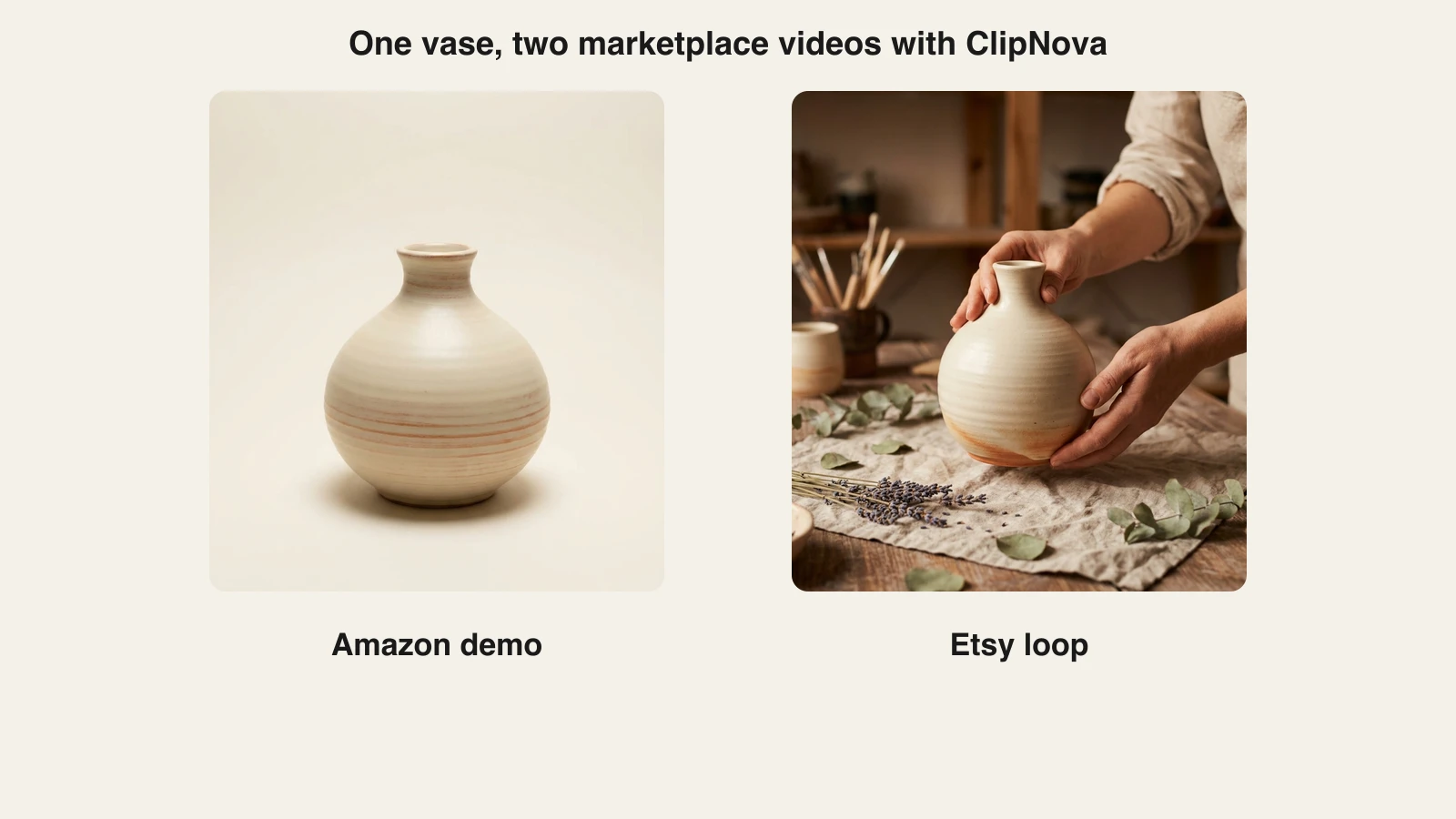
Make the Amazon cut. Set the aspect ratio to 16:9 and the longest length available to you (up to 12 seconds, or up to 30 seconds on Ultra quality). The clip comes with music but no voiceover or captions, which suits shoppers who watch muted; if you want spoken copy, add it in an editor. Keep anything a moderator could read as a price, promotion, or review claim out of your brief.
-
Make the Etsy cut. Generate a second clip in square or vertical, under 15 seconds, with a brief built for no sound at all: the slow rotation, the texture close-up, the styled shelf moment. Etsy removes the music track anyway, so the motion has to carry it.
- Export and upload. Every ClipNova plan exports watermark-free 1080p with full commercial rights, which clears both marketplaces' bars. Upload the 16:9 file through Upload and Manage Videos in Seller Central and the short cut through your Etsy listing editor, then let the reviews run. Plans start at $19 per month with the full feature set on every tier; see ClipNova pricing for the credit breakdown.
The whole loop, from photo to two upload-ready files, fits inside a coffee break. When it becomes routine, batch it: run every new product through the same two-cut process the day the listing goes up.
Other tools sellers use for listing videos
ClipNova covers the photo-to-video pipeline end to end, but a few other tools show up in marketplace sellers' workflows, and they are worth knowing.
- Creatify (from $39/mo for 100 credits) generates UGC-style video ads from a product URL, with AI presenters talking to camera. It is built for paid social rather than listing slots, so its output usually needs reframing and trimming before it fits Amazon's rules, but the URL-to-ad workflow is genuinely fast for ad testing.
- VEED (from $12/mo on annual billing) is a browser editor rather than a generator. It is handy when you already have footage and just need to trim, resize, or reformat it to hit Etsy's 15-second window or Amazon's 16:9 frame. If you have no footage yet, a VEED alternative that generates the clip is the faster route.
- InVideo AI (from $25/mo) turns prompts into template-and-stock-driven videos. It works for explainer-style content, though leaning on stock clips is risky for listings, where every frame must show your actual product.
The pattern: generators built around your own product photo fit listing slots best, editors help you meet specs with existing footage, and ad-focused tools serve the paid side of the funnel.
Final advice: one photo, two cuts, every listing
Treat listing videos as a format problem, not a production problem. The production is solved: one clean product photo plus a two-sentence brief gets you the footage. What separates sellers who benefit from those who get rejected is respecting each marketplace's format: landscape, compliant, and demonstrative for Amazon; short, silent, and tactile for Etsy.
Start with your best-selling listing rather than your whole catalog. Generate the two cuts, upload both, and watch the listing's conversion over a couple of weeks. Once the process feels mechanical, roll it across the catalog at whatever pace your credits allow.
And if your products are already photographed well, you are closer than you think: tools that animate stills have become remarkably good, and our roundup of the best AI photo to video tools shows what that category can do beyond marketplace listings.
Frequently asked
Can I add a video to my Amazon product listing?
Yes, if your brand is enrolled in Amazon Brand Registry. Registered sellers upload videos in Seller Central under Catalog, then Upload and Manage Videos, attach the video to an ASIN, and Amazon reviews it before it goes live, usually within 24 to 72 hours. Videos in customer reviews and the related videos section are open to more users, but the main image block on your own listing requires Brand Registry.
What are Amazon's product video requirements?
Amazon accepts MP4 or MOV files up to 5 GB for detail page videos. Use 16:9 landscape at 1920x1080 if you can; 1280x720 is the minimum. The video cannot show pricing, promotions, time-sensitive claims, customer reviews, star ratings, or references to other sellers or marketplaces. You also upload a cover thumbnail as a JPEG or PNG.
How long can an Etsy listing video be?
Etsy listing videos run 5 to 15 seconds. If your clip is longer, you trim it during upload, so generate a short loop that makes its point immediately: the product in use, a slow rotation, or a close-up of texture and detail. Files must stay under 100 MB, and MP4 with the H.264 codec uploads most reliably.
Do Etsy listing videos have sound?
No. Etsy automatically removes audio from every listing video, so there is no point adding a voiceover or music to your Etsy cut. Design the clip to work silently: lead with motion, show the product clearly, and keep any text overlays away from the very top and bottom of the frame where Etsy's interface elements sit.
Can I use AI-generated videos on Amazon and Etsy listings?
Yes, as long as the video truthfully shows the product you ship. Both marketplaces judge listing media on accuracy, so generate scenes from your real product photo and reject any frame where the AI has altered the product's shape, color, or details. An AI lifestyle scene around an accurate product render is fine; a video of a product that looks better than the real item is not.
What aspect ratio should a listing video be for Amazon vs Etsy?
Make two cuts from the same project. Amazon strongly prefers 16:9 landscape for detail page videos, ideally at 1920x1080. Etsy supports square, portrait, and landscape between 2:1 and 1:2, and square or vertical tends to fill more of the gallery on mobile. In ClipNova you pick the aspect ratio per video, so generate one clip in each format from the same product photo.
How much does it cost to make a listing video with AI?
Far less than a product shoot. ClipNova plans begin at $19 per month with watermark-free 1080p and full commercial rights on every plan. Creatify starts at $39 per month and InVideo AI at $25 per month. A single studio product shoot typically costs more than a year of any of these subscriptions.
What is the easiest way to turn a product photo into a listing video?
Upload the photo to ClipNova's AI product video generator, describe the motion you want in one or two sentences, and generate a 16:9 clip for Amazon and a short vertical or square clip for Etsy. The tool animates your photo with music and keeps your product's shape, colours and label, so you get marketplace-ready files in minutes without filming anything.