You can make TikTok Shop UGC videos with AI by combining three ingredients: a clean product photo, a creator photo for the person who presents it on camera, and a hook that earns the first three seconds. Tools like ClipNova generate the whole video, script, voiceover, lip sync, and captions included, in minutes, and TikTok Shop allows the result as long as it is truthful and labeled as AI-generated. That combination is why AI UGC has become the default content engine for sellers and affiliates who need to test ten hooks a week instead of one.
This guide walks through the exact workflow: what TikTok Shop's AI content rules actually say (verified against the official seller policy), what to prepare before you generate, the step-by-step process in ClipNova, and the hook formulas that keep shoppable videos converting.
Why AI UGC works on TikTok Shop
TikTok Shop rewards content that feels native to the feed. Polished brand ads get scrolled past; a creator talking into their phone about a product they just tried gets watched. That creator-style format is UGC, and if you are new to the genre, our explainer on what a UGC creator does covers the style in depth. Creators who want to sell this format to brands can start by building a UGC portfolio with AI.
The problem is volume. TikTok Shop is a testing game: sellers and affiliates who win are usually posting daily and rotating hooks until one catches. Commissioning that much human UGC is slow and expensive, a single creator delivery can take a week and cost more than a month of an AI tool. Filming it all yourself caps you at your own face, energy, and schedule.
AI UGC removes the bottleneck. You generate a presenter, a script read, and captions from a creator photo and a product photo, then iterate on the hook instead of re-booking talent. The footage quality is now good enough that the deciding factor is no longer "does it look real", it is "does the hook stop the scroll".
Three jobs AI UGC does well for TikTok Shop:
- Hook testing at volume. Generate five versions of the same product video with five different opening lines, post them all, and double down on the winner.
- Affiliate showcase videos. Affiliates promoting products they do not physically own can still produce presenter-style videos from the listing images.
- Localization. The same product video re-voiced in another language for a second market, without re-shooting anything.
TikTok Shop's rules for AI content (read this first)
Before you generate anything, know the rules. TikTok Shop publishes an official policy called "AI-Generated Content Restrictions and Requirements" in its US seller university, and the platform-wide AI labeling rules apply on top of it. Here is where the lines sit as of August 2026:
| AI use on TikTok Shop | Status | What you must do |
|---|---|---|
| AI presenter or avatar showing a product | Allowed | Disclose AI use; keep claims truthful |
| AI voiceover on a shoppable video | Allowed | Disclose; must be accurate, not misleading |
| AI translation, dubbing, subtitles | Allowed | Keep translations accurate |
| Style conversions and quality touch-ups | Allowed | No disclosure needed for light edits |
| AI voices or pre-recorded audio on a LIVE | Prohibited | Speak in real time on livestreams |
| Still-image slideshows as shoppable videos | Prohibited | Include at least 3 seconds of dynamic content |
| Exaggerated results or altered product looks | Prohibited | Never misrepresent what ships |
| Fake experts endorsing a product | Prohibited | No invented doctors or professionals |
The three rules that matter most in practice:
- Disclose AI content. TikTok Shop's policy says all AI-related content must be truthful, accurate, and not misleading, and requires disclosure through on-screen text, a watermark or sticker, or the platform's AI-generated content toggle when posting. Failing to disclose significant AI use counts as a violation. TikTok also reads C2PA Content Credentials and can auto-label AI content it detects, so skipping the label rarely works anyway.
- Never misrepresent the product. Using AI to change a product's size, color, or effects (think instant hair growth or a serum that "erases" wrinkles in one frame) is prohibited even with a label. The product in your video must match the product that ships.
- Keep LIVEs human. TikTok Shop's quality rules for videos and LIVEs, updated in May 2026, ban AI-generated voices and pre-recorded audio from promotional livestreams, and require shoppable videos to contain dynamic footage rather than looping stills.
Penalties scale from warnings to post restrictions, deductions on your account health rating, and account suspension for repeat or severe violations. None of this makes AI UGC risky if you follow the workflow below: generate honest videos, toggle the label, and keep exaggerated claims out of your scripts.
What you need before you generate
The quality of your inputs sets the ceiling on the output. Gather three things first:
- One clean product photo. High resolution, plain background, sharp edges. Your TikTok Shop listing photo usually works. This is the anchor the AI builds scenes around.
- Two or three real benefits. Written as outcomes, not specs: "glow in two weeks" beats "2% niacinamide". These become your captions and your script's spine.
- A hook list. Write five opening lines before you open any tool. The hook is the highest-leverage sentence in the whole video, and having options ready is what makes AI volume useful.
How to make TikTok Shop UGC videos with ClipNova, step by step
ClipNova generates the finished shoppable video end to end: the creator from your photo, an AI-written script, voiceover with lip sync, burned-in captions, and 9:16 vertical export in one pass. For a TikTok Shop seller that means a finished ad from two photos, the same creator face and the same bottle in every version, and fresh versions to test by switching tone or length instead of reshooting. Every plan includes the full feature set with watermark-free 1080p and full commercial rights. The AI TikTok ad generator is the fastest route for TikTok Shop work.
Here is the exact workflow, using a skincare serum as the example product:
-
Sign up at app.clipnova.io. Open the AI TikTok Ad Generator, or the AI UGC generator if you want creator-style organic content rather than an ad cut.
-
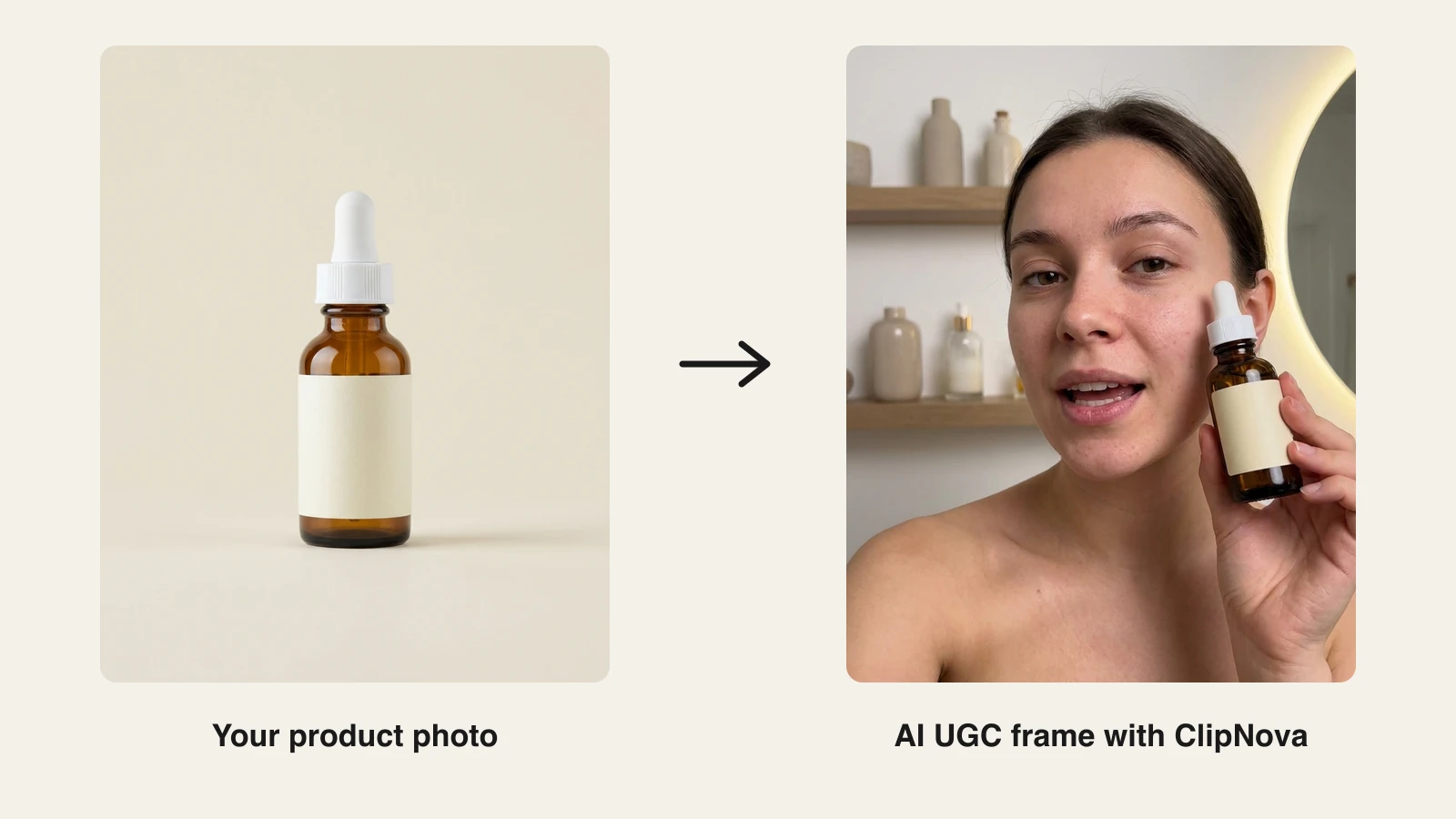
Upload your product photo. We dropped in a plain studio shot of an amber serum bottle, the same kind of image sitting in any TikTok Shop listing, plus a creator photo. ClipNova puts the two together, so the creator holds and references your actual product, keeping its shape, colours and label as in the photo.
-
Pick your creator, tone and length. Use a creator photo whose look matches your buyer (someone who has agreed to it, or yourself), choose a tone (Excited, Calm, Won over or Problem first) and a length of 15 to 45 seconds; UGC ads are always 9:16 vertical. Casual beats polished here: the video should feel like a person, not a commercial.
-
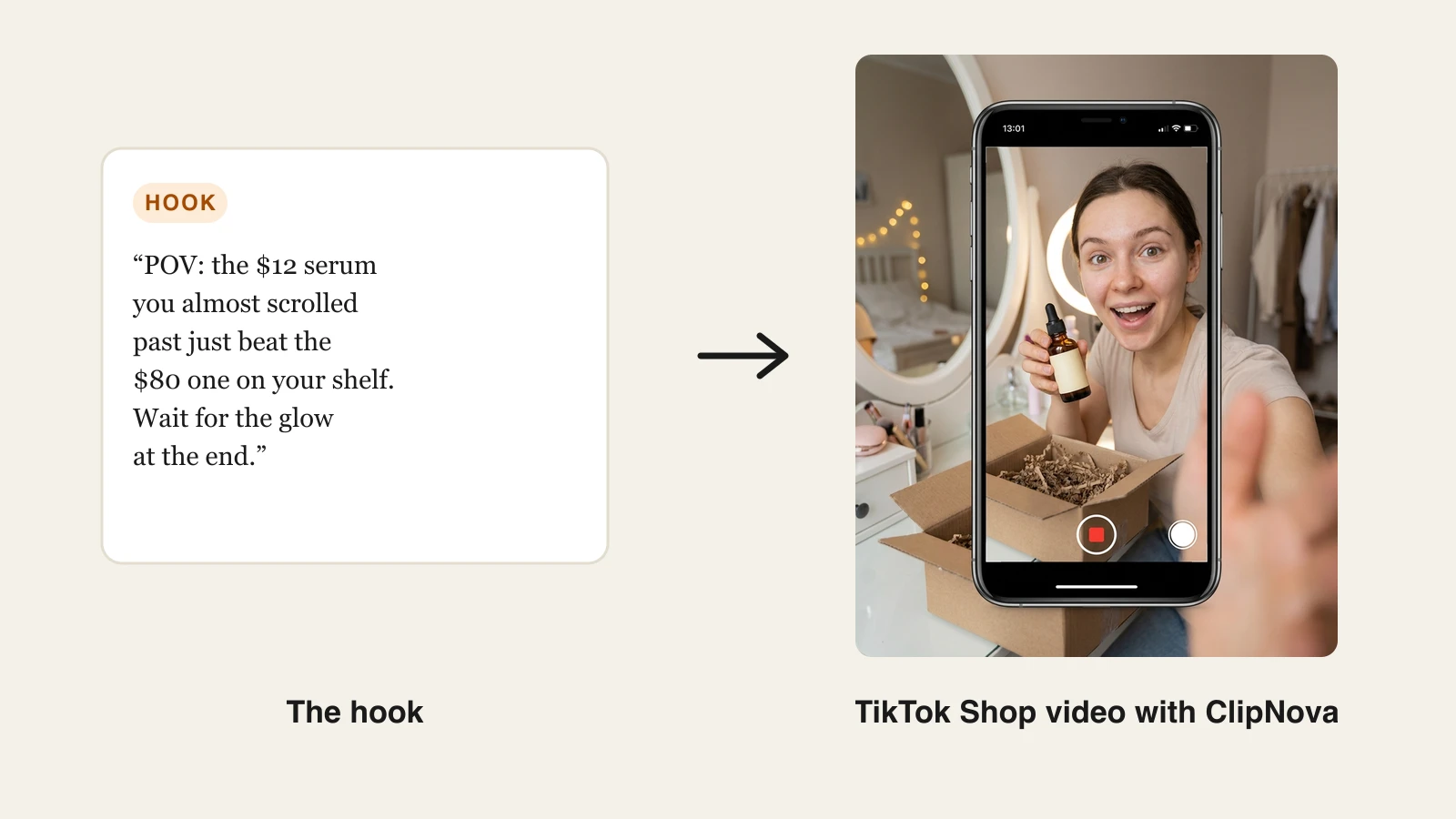
Steer the hook through the tone. ClipNova writes the script for you (hook, problem, reveal, proof, CTA), and you cannot paste your own, so use your hook list to choose the tone. This is the hook we were going for in the example frames in this post:
"POV: the $12 serum you almost scrolled past just beat the $80 one on your shelf. I have used it every night for two weeks, and this is the glow my expensive one never gave me. It is in my showcase, wait for the end."
Look for a read that front-loads the price anchor, keeps sentences short, and ends with a pointer to your showcase or the product link. ClipNova voices the script with lip sync on your creator photo.
-
Keep captions on. They are burned in by default, and they are non-negotiable: most TikTok viewers watch on mute, and burned-in captions keep the benefit on screen.
-
Generate, review, and re-run if needed. Watch the draft once with sound and once muted. If the read feels off, re-run with another tone or length. Check that the product on screen matches what ships: color, size, packaging.
-
Export and post with the AI label on. Export watermark-free 1080p vertical, post it through TikTok Shop with the product link attached, and enable the AI-generated content toggle (or add a visible "AI-generated" text overlay). That single tap keeps you compliant with the disclosure policy above.
-
Re-run it in other tones and lengths. Keep the same creator photo and product photo, then generate again with each of the other tones and a second length. Same product, same creator, several different first-three-seconds. Post them across the week and let TikTok Shop analytics tell you which hook sells.
Hook scripts that convert for TikTok Shop
The hook decides everything, so treat it as the variable you test. Three formulas that consistently work for shoppable videos:
- The price anchor. Compare the product to an expensive alternative in the first line: "POV: the $12 serum that beat my $80 one." It frames the purchase as smart, not impulsive.
- The reluctant convert. Open as a skeptic: "I did not want to like this, my sister would not stop sending it to me." Doubt reads as honesty, and honesty sells on TikTok.
- The specific result. Lead with one concrete, truthful outcome and a timeframe: "Two weeks, every night, and this is my skin without filters." Keep it accurate; exaggerated effects are exactly what TikTok Shop's AI policy prohibits.
The same product photo can carry all three angles. In ClipNova we rendered the serum as an unboxing, a demo, and a testimonial read, three separate shoppable videos from one listing image:
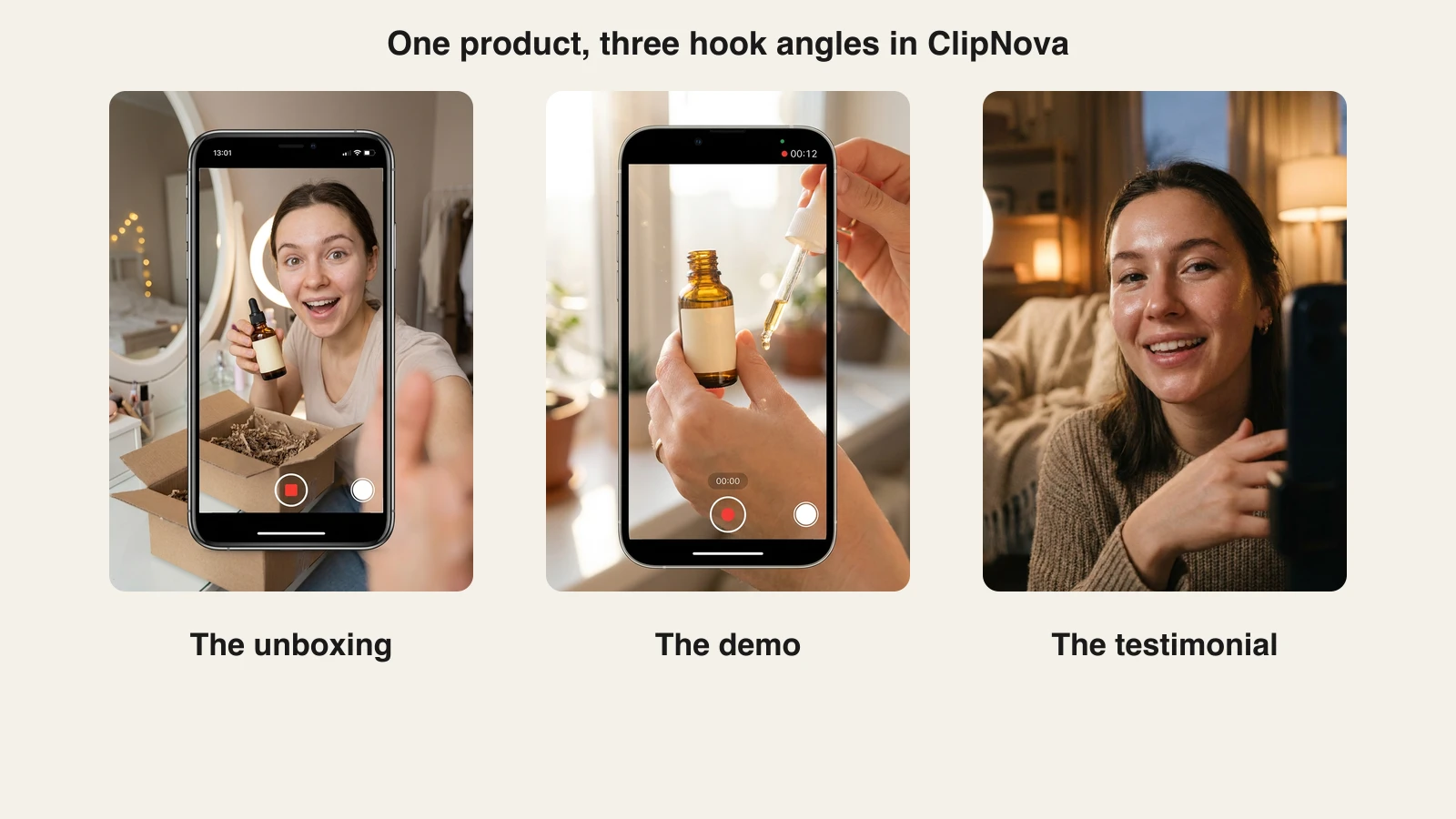
Rotate angles as well as hooks. An account that posts only testimonials starts to look templated; mixing unboxings, demos, and talking-head reviews keeps the shop's feed looking like a real creator runs it.
Other AI tools TikTok Shop sellers use
ClipNova is the strongest fit when you want the whole pipeline (script to captioned vertical video) in one subscription, but a few specialist tools are worth knowing. For a deeper side-by-side of this category, see our roundup of the best AI UGC ad generators:
| Tool | Starting price | Scope |
|---|---|---|
| ClipNova | From $19/mo | End-to-end UGC, ads, avatars, captions |
| Creatify | From $39/mo | UGC-style ads from product links |
| Arcads | From ≈$110/mo | Actor-led ad videos, ad-buyer focused |
| Topview | From $16/mo (annual) | Link-to-video ads, TikTok ad library tools |
Creatify turns a product URL into batches of ad variations with a large AI actor library; strong for pure ad buyers, though watermark removal requires the $99/mo Pro plan. Arcads produces some of the most natural actor performances in the category, but it starts at roughly $110/mo for 10 videos, which is steep for a seller still validating products. Topview is cheap and built around TikTok ad remixing, with shorter video length limits on lower tiers. For a deeper comparison of the ad-focused category, see our roundup of the best AI TikTok ad generators.
The practical difference: the specialist ad tools stop at the ad. ClipNova also covers the organic side of a TikTok Shop presence, faceless videos, talking avatars, and multi-language versions, on plans that all include every feature and differ only in credits.
Final advice: ship hooks, not masterpieces
TikTok Shop is not won by the best single video; it is won by the seller who tests the most hooks per week without breaking the rules. AI UGC makes that cadence affordable: one product photo and one creator photo become a week of shoppable videos, and the AI-generated label plus honest claims keep your account health clean.
Start with one product, write five hooks, and generate the batch in an afternoon. ClipNova plans start at $19/mo with full commercial rights and watermark-free exports on every tier, so the cost of finding your winning hook is a fraction of one human creator invoice.
Frequently asked
Can you use AI-generated videos on TikTok Shop?
Yes. TikTok Shop's official policy permits AI-generated content, including AI presenters, voiceovers, translations, and product demonstrations, as long as it is truthful, accurate, and not misleading. You must disclose significant AI use with on-screen text, a watermark or sticker, or the platform's AI-generated content toggle, and the product shown must match what actually ships.
Do TikTok Shop sellers have to disclose AI-generated content?
Yes. TikTok Shop requires disclosure of AI-generated content, and failing to disclose significant AI use counts as a false disclosure violation. The easiest route is to enable the AI-generated content toggle when posting, or to add a visible AI-generated text overlay to the video itself.
What happens if I do not label AI content on TikTok Shop?
Penalties scale with severity. Minor violations bring warnings and required corrections, while repeated or severe violations can lead to posting restrictions, account health rating deductions, disabled withdrawals, and account suspension. TikTok also reads C2PA Content Credentials to detect and auto-label AI content, so unlabeled synthetic videos are often caught anyway.
Can TikTok Shop affiliates make videos with AI?
Yes, and it is one of the strongest use cases. Affiliates can turn a product's listing photos into presenter-style showcase videos without owning the item, using a tool like ClipNova to turn a creator photo and the listing photo into a scripted, voiced, captioned read. Keep every claim accurate to the listing, attach the product link, and label the post as AI-generated.
Can I use an AI voice in a TikTok Shop livestream?
No. TikTok Shop's quality requirements for videos and LIVEs, updated in May 2026, ban AI-generated voices and pre-recorded audio from promotional livestreams, and all verbal interaction on a LIVE must happen in real time. Recorded shoppable videos are different: AI voiceovers are allowed there with proper disclosure.
How much does it cost to make TikTok Shop videos with AI?
Far less than commissioning creators. ClipNova plans begin at $19 per month with every feature included, watermark-free 1080p, and full commercial rights. Among specialist ad tools, Topview starts around $16 per month billed annually, Creatify at $39 per month, and Arcads at roughly $110 per month for 10 videos.
How do I make my AI UGC videos convert on TikTok Shop?
Treat the hook as the variable you test. Generate the same product video with five different opening lines, post them across the week, and scale the one that sells. Price-anchor hooks, reluctant-convert hooks, and specific truthful results work consistently, and burned-in captions are essential because most viewers watch on mute.
What is the best AI tool for TikTok Shop UGC videos?
ClipNova is the strongest all-round pick because it covers the entire TikTok Shop workflow in one subscription: a creator photo presenting your product, an AI-written hook script voiced with lip sync, auto captions, and vertical export, plus organic formats like faceless videos and talking avatars. Every plan includes the full feature set.